
5 Best Microsoft Defender Alternatives in 2026—and When Not to Switch
A different antivirus is only an upgrade when it fixes a problem Defender doesn't. We compared five realistic replacements by current protection, false alarms, system impact, price and the extra job each one performs.
Quick verdict: Choose Bitdefender Total Security for the most balanced paid replacement, Norton 360 Deluxe for a family bundle, ESET HOME Security Essential for granular controls and low measured impact, Avast Free Antivirus for a third-party free engine, or Malwarebytes when cleanup and a simpler security workflow matter most. Keep Defender if none of those reasons describes a problem you actually have.
Need a different Windows protection task? The complete Microsoft Defender guide hub routes evaluation, scans, exclusions, protection layers, troubleshooting, safe provider changes and alternatives without mixing their steps.
Start with the Microsoft Defender baseline, not a sales pitch
Microsoft Defender Antivirus is already installed, maintained through Windows Update and integrated with SmartScreen, Firewall and the Windows Security provider model. In the AV-TEST May–June 2026 Windows 11 cycle, it earned 17.5/18: full protection and usability scores, with half a point lost in performance. In the AV-Comparatives February–May 2026 Real-World Protection Test, it protected against 99.0% of 400 cases, left four compromised and produced zero false alarms.
Those figures don't make Defender the best answer for every household, but they rule out the lazy idea that every paid product is automatically safer. Our current Microsoft Defender review found a competent Windows baseline with unusually little purchase friction. Its real limitations are elsewhere: no conventional family console for managing a mixed fleet, no bundled consumer VPN or password manager, fewer consumer support paths and fewer controls for people who want to tune how the engine behaves.
That distinction matters because replacing an antivirus has a cost beyond the receipt. You add another account, updater, background service, renewal decision and set of notifications. The right alternative should earn that complexity by solving a named need.
What are you buying beyond Defender?
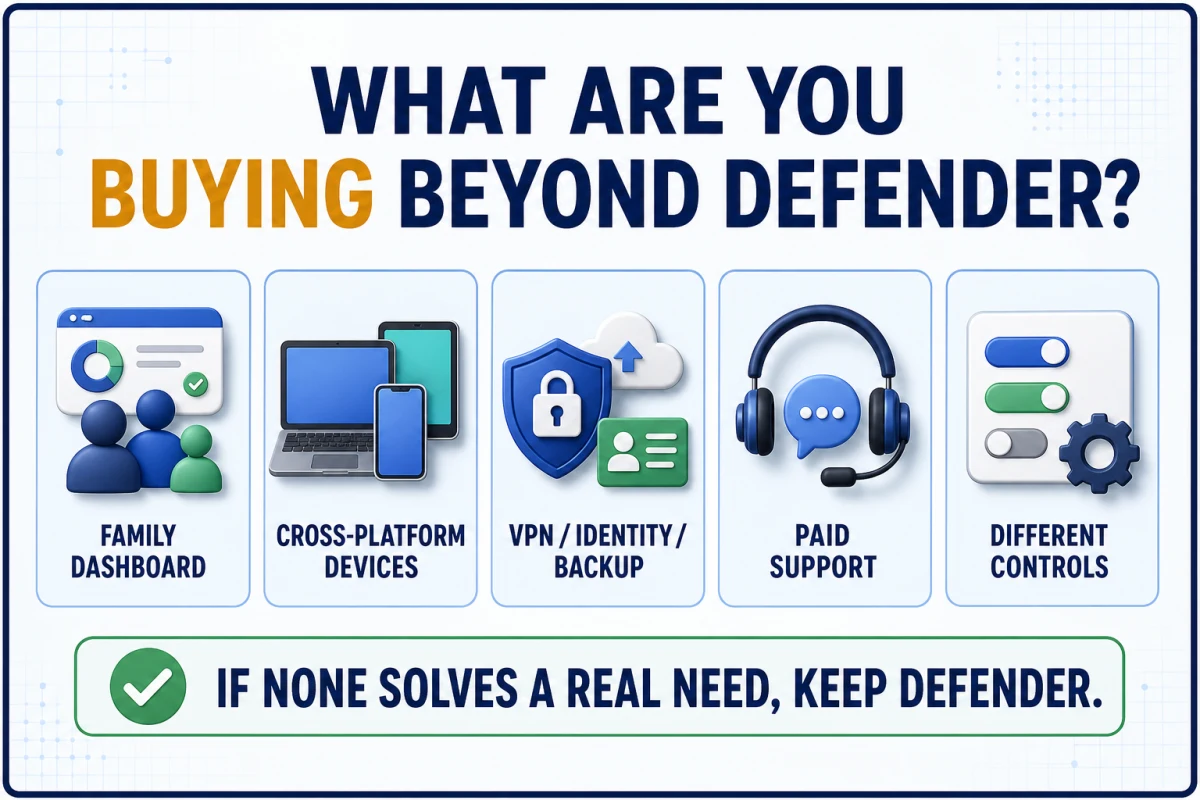
A family with Windows laptops, Macs, Android phones and iPhones has a different problem from a single-PC owner. A parent may value one dashboard and age-appropriate web controls. A traveler may want a VPN bundled into the same account. A developer may care more about exclusions, logs and predictable system impact than identity monitoring. A person cleaning an already-infected PC may need a second-opinion scanner, not a permanent suite.
Write the unmet need down before comparing badges. “I want better protection” is too vague because the current tests measure several dimensions and don't agree on one universal winner. “I need five-device coverage and family controls” or “I need the lowest measured impact among these choices” can be evaluated.
How we compared the five alternatives
We aligned products to the same current test windows wherever the labs allowed it. AV-TEST’s May–June 2026 Windows 11 results supply protection, performance and usability totals. AV-Comparatives’ February–May 2026 report supplies the real-world protection rate, compromised cases and false alarms. Its April 2026 Performance Test supplies a separate impact score, where lower is better.
No single number decides the ranking. A product can block slightly more test cases yet interrupt the user with more false alarms. A low impact score in a controlled lab can't promise the same experience on an older PC with a large development tree or slow disk. Features also need scrutiny: an included VPN may have a traffic cap, cloud backup may be Windows-only, and a free cleanup tool may lack real-time protection entirely.
Prices are US website prices checked July 29, 2026. First-year promotions can change without notice, and a renewal can matter more than the introductory figure. We also reviewed current vendor documentation and recent r/antivirus discussions for recurring ownership friction. Community comments helped identify questions about pop-ups, renewals and compatibility; they didn't replace test results or official terms.
Microsoft Defender alternatives compared at a glance
| Product | Best reason to switch | AV-TEST May–June 2026 | AV-C protection / false alarms | AV-C impact | US price checked July 29 |
|---|---|---|---|---|---|
| Microsoft Defender Baseline | Built in, no extra bill or account | 17.5/18 | 99.0% / 0 | 12.9 | $0 |
| Bitdefender Total Security #1 overall paid | Strong mixed-device protection | 18/18 | 99.5% / 5 | 9.6 | $59.99 first year, 5 devices |
| Norton 360 Deluxe #2 family bundle | VPN, family and identity tools | 18/18 | 99.3% / 5 | 5.3 | $49.99 first year; $124.99 renewal, 5 devices |
| ESET HOME Security Essential #3 controls and impact | Granular controls, low measured impact | 18/18 | 98.5% / 2 | 4.2 | $49.99 first year, 1 device |
| Avast Free Antivirus #4 free replacement | Third-party engine at no cost | 18/18 | 99.3% / 5 | 5.5 | $0 |
| Malwarebytes Standard #5 cleanup-first | Simple remediation-focused workflow | Not in this cycle | 98.8% / 39 | 17.6 | $44.99 first year, 1 device |
The table is a decision aid, not a league table. Bitdefender had the highest protection rate in this AV-Comparatives cycle. ESET produced the lowest impact score among these options. Microsoft recorded no false alarms. Malwarebytes’ 39 false alarms and 17.6 impact score are material caveats, and Malwarebytes wasn't listed in the May–June 2026 AV-TEST Windows 11 cycle, so we don't attach a made-up current total to it.
1. Bitdefender Total Security: best overall paid replacement
Bitdefender is the most balanced answer for a household that wants another primary engine across Windows, macOS, Android and iOS. It led this shortlist in the current AV-Comparatives real-world test at 99.5%, with two compromised cases and five false alarms. It also earned 18/18 in the current AV-TEST Windows 11 cycle. Those results are strong without requiring us to claim perfection or extrapolate beyond the test periods.
The current Bitdefender Total Security offer was $59.99 for five devices for the first year. The plan adds anti-phishing and ransomware layers, device tools, a password manager trial and a basic VPN. The VPN detail is easy to misunderstand: Total Security’s included allowance is 200 MB per day per device, not the unlimited tier. If an unlimited VPN is the reason for leaving Defender, compare Bitdefender Premium Security or a separate VPN instead of assuming the base bundle covers it.
Choose Bitdefender when mixed-device coverage and a consistently strong protection result are worth a new account and renewal decision. Skip it if you own one Windows PC, dislike suite notifications or need an unlimited VPN at the lowest tier. Our full Bitdefender review covers the interface and plan differences, while Microsoft Defender vs Bitdefender narrows the choice to these two products.
2. Norton 360 Deluxe: best all-in-one family bundle
Norton earns its place when the purchase is about the bundle. The current Norton 360 Deluxe page combines antivirus for five devices with VPN, password management, parental controls, dark web monitoring and 50 GB of Windows cloud backup. That's a meaningful upgrade for a family that would otherwise buy and manage several services. It's unnecessary weight for a user who only wants malware scanning.
The first-year US price was $49.99. Norton’s separate published renewal-price list showed $124.99 for Norton 360 Deluxe, so the second bill belongs in the decision, not in fine print after checkout. Current lab performance was strong: 18/18 at AV-TEST, 99.3% with five false alarms in the AV-Comparatives protection test, and a 5.3 impact score.
Choose Norton when parental controls, VPN and identity-related tools replace services you'd pay for anyway. Avoid buying it solely because the feature list is long; unused features still create settings, alerts and renewal friction. Read our Norton 360 review and the direct Defender vs Norton comparison before committing to the bundle.
3. ESET HOME Security Essential: best controls and lowest measured impact
ESET is the strongest fit for users who want a conventional paid antivirus with granular settings and less emphasis on identity-marketing extras. In the April 2026 AV-Comparatives performance test, its 4.2 impact score was the lowest among every product in this comparison. It also earned 18/18 in the May–June AV-TEST cycle. Its 98.5% protection rate in the AV-Comparatives real-world test was the lowest of the five alternatives, but it paired that result with only two false alarms.
The current ESET HOME Security plans started with HOME Security Essential at $49.99 for one device; the three-device configuration was $59.99. Essential includes core antivirus and privacy/payment protection, but feature availability differs by operating system and tier. Check the device icons beside the exact feature rather than assuming a Windows capability appears identically on macOS, Android or iOS.
Choose ESET for a gaming or work PC where predictable impact and control are more valuable than a large consumer-services bundle. Don't choose it because one benchmark guarantees that your PC will be faster; the lab result is comparative evidence, not a machine-specific promise. Our ESET review goes deeper into settings, plans and platform limits.
4. Avast Free Antivirus: best free third-party replacement
Avast Free is the only option here that can replace Defender as the active real-time provider without adding a subscription. Its current results were competitive: 18/18 at AV-TEST, a 99.3% protection rate with five false alarms at AV-Comparatives, and a 5.5 impact score. That makes it a credible engine change, not a crippled demo.
The trade is commercial friction. Avast Free promotes paid features, and some users prefer Defender precisely because Windows already owns the notifications and update path. Avast is also part of Gen Digital, as is Norton, and AV-Comparatives notes that Avast, AVG and Norton use the Avast engine. That doesn't make their interfaces, support, behavior or bundles identical, but it matters if the goal is maximum engine diversity.
The Avast US store listed Free at $0. For context, Avast Premium Security for 10 devices was $69.48 for the first year and $99.99 at renewal; Avast Ultimate was $69.48 initially and $139.99 at renewal. Choose Free because you prefer its controls or engine, not as a stepping stone you expect to remain invisible. Our Avast review covers the upsells and ownership context.
5. Malwarebytes: best cleanup-first option, with one crucial distinction
Malwarebytes Free and Malwarebytes Standard answer different questions. Free is an on-demand scanner and cleanup tool. It can sit beside Defender for occasional second-opinion scans, but it doesn't provide the continuous real-time protection needed to replace Defender. Malwarebytes Standard adds real-time layers and can become the registered provider.
The current Malwarebytes plan page describes those tier differences. In the US snapshot we verified, Malwarebytes Standard was $44.99 for one device and $59.99 for three devices. The paid product’s straightforward remediation workflow is attractive when the main job is dealing with potentially unwanted programs or cleaning up after a suspicious event.
Current comparative evidence is the reason Malwarebytes ranks fifth rather than first. It protected against 98.8% of the AV-Comparatives cases but recorded 39 false alarms and a 17.6 performance impact score. It didn't appear in the AV-TEST May–June 2026 Windows 11 result list, so an older score shouldn't be passed off as current. Keep Defender active with Malwarebytes Free. Consider paid Standard only if its workflow and protection model matter more to you than the current comparative caveats. Our Malwarebytes review and Malwarebytes vs Defender comparison explain the two configurations.
Why Kaspersky isn't ranked for US buyers
Some high-ranking alternatives pages still include Kaspersky because they reuse an older global list. This guide is for US purchasing and support reality. The US Bureau of Industry and Security’s Kaspersky transaction prohibition states that new agreements with US persons were prohibited from July 20, 2024, and delivery of updates and Kaspersky Security Network services to US persons was prohibited after September 29, 2024.
An antivirus that can't lawfully provide the normal update and cloud-service path isn't a practical current recommendation in the United States. This is a market-availability decision, not a claim about a historic lab score. Readers outside the US should check their own laws, product availability, update service and vendor support rather than importing the US conclusion without context.
How to switch from Microsoft Defender without leaving a protection gap
- Download from the vendor’s official site. Avoid “download portals,” coupon installers and search ads that don't clearly lead to the vendor domain.
- Remove an old third-party suite first if one is still registered. Use its normal uninstaller and official cleanup utility only when the vendor recommends it.
- Install and update the new antivirus. Let it register with Windows Security instead of manually disabling Defender services or Registry keys.
- Open Windows Security → Settings → Manage providers. Confirm the new product is active and healthy. Defender should leave active mode automatically when a compatible provider takes ownership.
- Run an update and first scan. Review detections before deleting files, especially if the product reports development tools, archives or utilities you intentionally use.
- Check the renewal and account controls. Record the renewal price and date, decide whether automatic renewal is wanted, and confirm the protected device count.
Our Defender enable/disable guide explains why the supported provider handoff is safer than fighting Tamper Protection. If the new antivirus and Defender both appear broken, use the Defender repair sequence before stacking more security software. The rule is one primary real-time provider; the distinction between that and periodic scanning is covered in should you run two antivirus products?
Choose by scenario, not by the longest feature list
| Your situation | Best starting point | Reason |
|---|---|---|
| One Windows 11 PC, careful user, no missing feature | Keep Microsoft Defender | Good current baseline with no extra account or renewal |
| Mixed Windows, Mac and mobile household | Bitdefender Total Security | Balanced cross-platform paid protection |
| Family wants VPN, parental tools and backup | Norton 360 Deluxe | The bundle replaces several separate subscriptions |
| Power user wants controls and low measured impact | ESET HOME Security Essential | 4.2 current AV-C impact score and granular configuration |
| Free third-party real-time engine | Avast Free Antivirus | Current lab coverage without a subscription |
| Second opinion or cleanup after an incident | Defender + Malwarebytes Free | Free Malwarebytes scans on demand while Defender remains primary |
If the decision is still unclear, start with the no-cost baseline rather than buying uncertainty. Keep Defender, update Windows, harden the browser and backup important files. Revisit the choice when a concrete need appears. Our broader best antivirus for Windows 11 guide compares more products, but a longer shortlist shouldn't replace a clearer requirement.
Microsoft Defender alternatives FAQ
Is Microsoft Defender good enough in 2026?
For many careful Windows 11 users, yes. Microsoft Defender is built in, costs nothing extra, produced a 99.0% protection rate with zero false alarms in the AV-Comparatives February–May 2026 test, and earned 17.5/18 in AV-TEST’s May–June 2026 Windows 11 cycle. A paid alternative makes more sense when it solves a specific need such as mixed-device coverage, family controls, a security bundle, paid support or different tuning controls.
What is the best overall alternative to Microsoft Defender?
Bitdefender Total Security is our best overall paid replacement because it combines strong current protection results with Windows, macOS, Android and iOS coverage. Norton 360 Deluxe is the stronger choice when VPN, parental controls, password management, dark web monitoring and Windows cloud backup are the reason for switching.
What is the best free alternative to Windows Defender?
Avast Free Antivirus is the strongest third-party free replacement in this shortlist, with an 18/18 AV-TEST total and a 99.3% AV-Comparatives protection rate in the current cycles we checked. Defender remains the cleaner zero-upsell option, so switch only if you prefer Avast’s interface, behavior shields or another Avast-specific control.
Can Malwarebytes Free replace Microsoft Defender?
No. Malwarebytes Free is an on-demand scanner and cleanup tool, not a primary real-time antivirus replacement. Keep Defender active when using the free edition. Malwarebytes Standard adds real-time protection and can become the registered antivirus provider, but its current AV-Comparatives false-alarm and performance results deserve consideration.
Is ESET lighter than Microsoft Defender?
In AV-Comparatives’ April 2026 performance test, ESET recorded a 4.2 impact score versus Microsoft’s 12.9, and lower was better. That controlled result supports ESET as the lightest measured option in this shortlist, but hardware, installed software and scanning settings can change the experience on an individual PC.
Should I disable Defender before installing another antivirus?
Usually no. Install the compatible antivirus normally and let it register with Windows Security; Microsoft Defender Antivirus should then leave active mode automatically. Confirm the new provider is healthy before removing anything, and never use a registry hack or service-disabling script as the handoff method.
Why is Kaspersky not in this US alternatives list?
The US Bureau of Industry and Security prohibited new Kaspersky agreements with US persons from July 20, 2024 and prohibited delivery of updates and Kaspersky Security Network services to US persons after September 29, 2024. That makes it an impractical current recommendation for a US-focused guide regardless of older lab or editorial rankings.
Can I run Defender and another antivirus together?
Use one primary real-time antivirus. A compatible third-party product normally becomes the registered provider while Defender leaves active mode. Defender periodic scanning or an on-demand second-opinion tool can be useful, but two primary real-time engines can create duplicate scanning, performance problems and confusing remediation.
Bottom line: switch for a capability, not for anxiety
Bitdefender is the most balanced paid replacement, Norton is the strongest family bundle, ESET is the control-and-impact choice, Avast Free is the credible no-cost third-party engine, and Malwarebytes is the cleanup-first option with a clear Free-versus-paid boundary. Each one can be right for a specific job.
If you can't name that job, keep Microsoft Defender. Its current results are strong enough that the burden of proof belongs to the replacement. A useful antivirus choice removes a real risk or management problem; it doesn't merely move the shield icon and add a renewal.