
AVG Secure Browser Review 2026: Useful Privacy Defaults, but You Do Not Need It
AVG Secure Browser is a familiar Chromium browser with useful blocking controls. The honest question isn't whether it's malware; it's whether those defaults earn another browser, another set of prompts and possibly another subscription.

Quick answer: AVG Secure Browser is a legitimate Chromium-based browser, not a virus. Its free edition adds Privacy Guard, Web Shield, ad blocking and a centralized Security & Privacy Center. Keep it if you want those controls preconfigured and like a Chrome-style interface. Remove it if it arrived as an unwanted install choice, changed your default, duplicates Brave or a hardened Firefox setup, or if the PRO browser-only VPN doesn't justify another subscription.
Need a different AVG task? The complete AVG guide hub routes review, plans, setup, troubleshooting, Web Shield, privacy, browser, VPN, Android, utilities, billing and removal without mixing their steps.
Our verdict: capable and legitimate, but optional
AVG Secure Browser solves a real usability problem: many people want phishing protection, tracker blocking and sensible privacy controls without assembling extensions. It puts those switches in one Security & Privacy Center and keeps the interface familiar to anyone who has used Chrome or Edge.
That convenience isn't the same as a unique security engine. The browser sits on Chromium, while AVG supplies its own blocking, Web Shield and product integrations. A maintained Chrome, Edge, Brave or Firefox installation with careful settings can also be safe. Your antivirus still scans downloads and processes outside the browser; the browser doesn't replace the AVG Antivirus protection layer.
Bottom line: keep it because you prefer its defaults, not because an installer made the decision for you. If another browser already gives you trustworthy updates, blocking and password management, duplication adds more profiles, saved data and notification surfaces than protection.
What AVG Secure Browser actually is
AVG describes Secure Browser as a browser with built-in security and privacy tools. Its current FAQ says it can run alongside other browsers and import history, bookmarks, passwords and cookies from popular alternatives. That import is convenient, but importing cookies and passwords also moves sensitive state. Use it only on your own device and delete the old profile only after confirming the new one works.
The browser is currently offered for Windows, macOS and Android. It isn't the AVG antivirus interface and doesn't activate Internet Security. AVG also says Secure Browser PRO, Internet Security and the standalone Secure VPN are separate products requiring their own entitlements. The shared brand can make the products look like one subscription even when the account treats them separately.
Because it uses Chromium, websites and Chrome-style extensions generally feel familiar. Chromium inheritance also means the browser depends on timely upstream security work and AVG shipping those updates. Check the About page when troubleshooting, just as you'd with Chrome or Edge; a privacy toggle can't compensate for an outdated browser build.
The free edition puts useful controls in one place
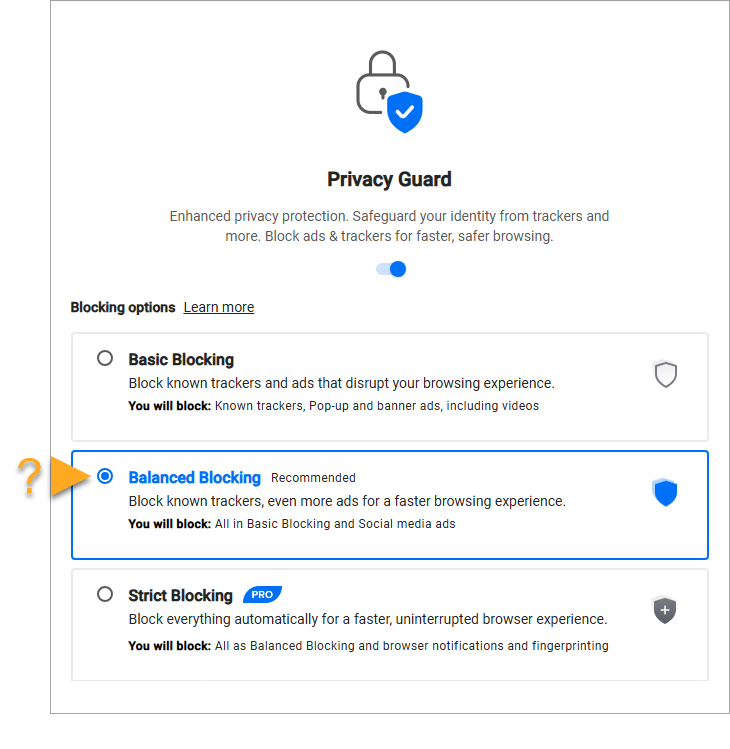
The official product page emphasizes ad blocking, tracker blocking and defenses against malicious sites and downloads. In the support documentation, the Security & Privacy Center includes Privacy Guard, Web Shield, password-manager selection and a security check. Most controls are enabled by default, which is the main advantage over a browser that expects the user to discover extensions.
Privacy Guard compares page scripts with filter lists and offers blocking modes. Stronger blocking can break login buttons, video players, payment widgets or consent panels. When one site fails, make a site-specific allowance before lowering protection everywhere. Web Shield blocks known malicious sites and downloads, but it can't judge every new scam, trusted account takeover or fraudulent marketplace seller.
Password-manager support is useful only if you choose one system and secure it well. Avoid leaving the same vault, browser sync and export file scattered across several profiles. Screen Sharing mode can hide parts of the browser during a presentation, but it doesn't redact private content already open in the page itself.
“Secure” and “private” need a threat model
A secure browser must resist malicious content and ship patches quickly. A private browser must also limit tracking, reduce unnecessary data flow and make controls understandable. AVG Secure Browser helps with ads, trackers and dangerous destinations, but the name alone doesn't prove minimum telemetry or anonymity.
Review the default search provider, browser sign-in, sync, crash reporting, usage analytics, startup behavior and site permissions. AVG’s product privacy policy explains product-specific processing; read the Secure Browser entry rather than assuming the antivirus policy describes browser history and web features. Private Mode mainly limits history retained on the device. It doesn't hide activity from a workplace, ISP, signed-in website or network observer.
The browser can reduce a large class of commercial tracking, but logging into Google, Meta or a retailer still identifies the session to that service. Fingerprinting defenses reduce signals; they don't make every browser instance indistinguishable. For sensitive anonymity work, a mainstream signed-in browser is the wrong tool regardless of its shield icon.
Community complaints often focus less on exploit protection than consent: the browser appeared, launched at startup or became default. A recent r/browsers thread contains exactly that frustration. Treat it as evidence of the question users face, not a measured installation rate.
Secure Browser PRO isn't the same as AVG Secure VPN
AVG’s FAQ says the desktop PRO tier adds an unlimited built-in VPN with more than 30 locations and automatic ad and tracker blocking. Its own comparison says the desktop browser VPN protects browser traffic, while standalone AVG Secure VPN protects full-device traffic and offers more protocols, locations, local-device access and private-network exclusions. On Android, the documentation also describes device-wide VPN behavior for PRO, so verify the platform-specific screen before buying.
PRO is valid on up to five Windows and Android devices according to the current support page. It doesn't include AVG Internet Security or automatically grant the standalone VPN. If you need every app protected on Windows or macOS, read our AVG Secure VPN review before paying for the browser tier.
Don't run two VPN tunnels from AVG products at the same time. Competing routes can cause DNS failures, lost local-printer access or an apparent connection that doesn't match the expected app. Choose one tunnel, verify the external IP and test access to the services you actually use.
Compatibility is strong; extra layers can still break sites
Chromium gives Secure Browser broad compatibility with modern web applications and familiar extension behavior. The practical failures come from blocking rather than rendering: an aggressive privacy rule may stop a checkout widget, federated sign-in or embedded support chat. Disable one control for the affected site, reload, and restore it afterward if possible.
Performance claims such as “faster because ads are blocked” depend on the page. Removing heavy ad scripts can reduce network and CPU work, while running another browser profile, extension set, VPN and background updater can add memory and disk activity. Compare the same sites after a clean restart, not a fresh empty AVG tab against a Chrome session holding 40 tabs.
If pages won't load only while AVG antivirus Web Shield is active, the browser may be innocent. Follow the AVG Web Shield troubleshooting path. If every browser works except Secure Browser, reset its site data or profile after exporting data you need.
Why the browser may appear or become your default
Secure Browser can be presented as an optional component during another AVG installation or update. A rushed installer flow can make the result feel like a silent install even when an offer was displayed. That's a consent and design problem, but it isn't proof that the signed AVG application is malware.
First confirm the application publisher and path. If the “AVG browser” came from a pop-up, cracked installer or unknown download site, scan the installer and remove it. The official product should be obtained from AVG. Then inspect Windows Default apps or the equivalent macOS/Android setting and select the browser you actually want. AVG’s getting-started guide shows both its default-browser and startup controls.
Changing the default is enough if you want to keep AVG as a secondary browser. Turn off automatic launch under Settings and On startup. Don't delete program folders manually; that leaves updater tasks and profile data in an uncertain state.
How it compares with Chrome, Brave and Firefox
| Browser | Best reason to choose it | Main trade-off |
|---|---|---|
| AVG Secure Browser | Centralized AVG blocking controls in a familiar Chromium interface | Extra AVG product prompts and limited differentiation if you already configured another browser |
| Chrome | Google account integration and broad managed-enterprise support | Weaker privacy-first defaults and a Google-centered data relationship |
| Brave | Strong built-in tracker/ad blocking with transparent privacy positioning | Its optional rewards, wallet and AI features may still need pruning |
| Firefox | Non-Chromium engine diversity and deep privacy customization | Some sites are tested less carefully outside Chromium |
Brave documents its built-in protections in its privacy features overview, while Mozilla publishes its own Firefox privacy notice. Vendor pages aren't neutral reviews, but they let you compare stated behavior and available controls.
The best choice is the one you can keep updated and understand. If a family member recognizes Chrome but never configures extensions, AVG’s defaults may help. If they panic at branded offers or accidental default changes, a quieter browser is safer in practice.
Who should keep AVG Secure Browser
Keep it if you want a Chrome-like browser with blocking already enabled, can recognize when a site-specific exception is needed, and prefer AVG’s security center to assembling extensions. It also makes sense as a separate profile for shopping or banking, provided you don't mistake separation for anonymity.
Remove it if it wasn't an intentional choice, if you already use Brave or a well-configured Firefox profile, if the prompts confuse the person using the computer, or if you don't want another AVG account and subscription path. Protection quality is only one part of safe software; consent, clarity and maintenance matter too.
If unwanted prompts are the wider issue, use the AVG popup and privacy settings guide. If the concern is AVG as a whole, compare replacements in our AVG alternatives guide before removing the resident antivirus.
How to remove AVG Secure Browser without losing what you need
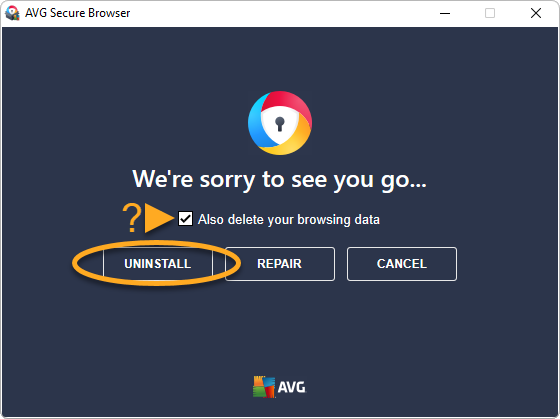
Export bookmarks and any passwords that exist only in the AVG profile. Set your replacement as default first so links continue opening somewhere predictable. On Windows, open Settings, Apps, Installed apps, find AVG Secure Browser and choose Uninstall. The official uninstall guide shows a checkbox for deleting browsing data; leave it unticked until your migration is verified.
On macOS, quit the browser, move it from Applications to Trash and empty Trash when ready. On Android, uninstall it through Google Play or Settings, Apps. Then check the operating system’s default browser, startup apps and taskbar/dock shortcuts. A stale shortcut isn't a running installation.
Removing Secure Browser doesn't remove AVG Antivirus, cancel Secure Browser PRO or cancel another AVG subscription. Billing is a separate account action; use the AVG cancellation and refund guide if a paid entitlement exists.
AVG Secure Browser FAQ
Is AVG Secure Browser safe?
Yes, it's a legitimate browser published by AVG. It uses Chromium and includes AVG privacy and web-protection controls. That doesn't make every default ideal for every user, so review the search provider, startup behavior, sync, privacy options and installed extensions.
Is AVG Secure Browser a virus?
No. An unexpected installation or default-browser change can feel intrusive, but the official AVG application isn't malware. Confirm the publisher and install path if the copy came from anywhere other than AVG or a known AVG installer.
Why did AVG Secure Browser install itself?
It can be offered during installation or update of another AVG product. A preselected or quickly accepted offer is different from a drive-by malware install. Remove it if you didn't intend to keep it, then review optional-product choices during future updates.
How do I stop AVG Secure Browser from being default?
Choose the browser you want under the operating system's Default apps settings, including HTTP, HTTPS and common web-file associations where Windows lists them separately. In AVG Secure Browser, also turn off its startup option if it shouldn't launch automatically.
Does AVG Secure Browser include a free VPN?
The feature varies by platform. AVG documents browser VPN behavior and a paid Secure Browser PRO tier; desktop PRO protects browser traffic, while Android documentation also describes device-wide VPN. Don't assume the free browser replaces a full-device VPN.
Is AVG Secure Browser better than Chrome?
It has stronger privacy and blocking defaults than a stock Chrome installation, but it's still Chromium-based and adds AVG services and prompts. Chrome may have smoother Google-account integration; Brave or Firefox may be better fits for users prioritizing independent privacy controls.
Can I use AVG Secure Browser without AVG Antivirus?
Yes. It's a separate browser and can run alongside another antivirus and other browsers. Likewise, uninstalling the browser doesn't remove AVG Antivirus or cancel any AVG subscription.
How do I uninstall AVG Secure Browser completely?
First export bookmarks and passwords you need. On Windows use Settings, Apps, Installed apps, AVG Secure Browser, Uninstall; choose whether browsing data should be deleted. On macOS move the application to Trash, and on Android uninstall it through Google Play or App info.