
Malwarebytes for Mac Review 2026: Fast Scans, Real Limits
The current Mac app is far more than the old cleanup scanner. It's also missing the one piece of proof a careful buyer should want most: a place in the dedicated 2026 Mac lab test.

Quick answer: Malwarebytes for Mac is a good fit when you want a fast second-opinion scanner or uncomplicated paid real-time protection on a Mac that regularly installs software outside the App Store. Version 5.24 supports current macOS releases, the free edition still runs manual scans, and paid plans add scheduled scanning plus Malware Protection, App Block and Web Protection. The reservation is evidence: Malwarebytes wasn't among the nine products in AV-Comparatives' dedicated April/May 2026 Mac test, so Windows awards and Windows protection scores can't close the Mac-specific proof gap. Buyers who want a Mac firewall, parental controls, automatic scan-on-mount or richer security reporting should compare Intego, Bitdefender and Norton before paying.
Malwarebytes for Mac verdict at a glance
Malwarebytes is still one of the easiest tools to hand to a Mac owner who says, “Something feels wrong; please scan it.” The free edition keeps that useful role. The paid Mac app is now broader than the reputation: it can run real-time malware and app protection, block app-initiated web threats, schedule scans, quarantine detections and target an external drive with Custom Scan.
That makes the product defensible for a MacBook used to install developer tools, utilities, browser extensions and software from outside the App Store. It's less convincing as an all-in-one family suite. Malwarebytes doesn't supply the Mac-first firewall controls found in Intego, and it doesn't add parental controls or cloud backup. Browser Guard is useful but separate, and a current Macworld test found its browsing protection inconsistent enough to deserve testing rather than blind trust.
The decisive reservation isn't a bad lab score. It's the absence of a current one for this platform. The AV-Comparatives Mac Security Test & Review 2026 evaluated nine current products on macOS Tahoe, and Malwarebytes wasn't in the participant list. We won't fill that blank with a Windows badge, a Windows percentage or an Android certificate.
| Question | Our answer | What to verify yourself |
|---|---|---|
| Good free scanner? | Yes, for manual second-opinion checks and cleanup | Run it after a suspicious download and inspect the report |
| Good primary paid antivirus? | Reasonable for simple real-time protection; evidence gap remains | All real-time tiles active, normal workload remains responsive |
| Best complete Mac suite? | No; firewall, family controls and reporting are limited | Compare the missing feature, not only the introductory price |
| Strong 2026 Mac lab proof? | Not established by the dedicated AV-Comparatives report | Look for a future Mac-specific participation result |
| Our practical position | Try Free first; pay when automatic protection solves a defined risk | Use the trial and permission checklist below |
What changed in Malwarebytes for Mac 5.24
The current official release note identifies Malwarebytes for Mac 5.24.0, released June 22, 2026. It redesigned the My subscription page, improved activation for multi-device subscriptions and added stated support for macOS 27 beta. The same note says the release fixed a case where enabling the VPN stopped internet access and a case where the Web Protection banner didn't appear on the dashboard.
Those details matter more than a generic “updated for 2026” label. A buyer should know which app generation a review describes, particularly when older search results still treat Malwarebytes as an on-demand-only scanner. Version 5 has existed since 2024, while Quick and Threat scan choices, Custom Scan and external-drive selection were added or expanded across later 2025 releases.
Beta support deserves a boundary. The stable requirements page currently ends at Tahoe 26. A release note saying macOS 27 beta is supported means Malwarebytes is testing the next platform; it doesn't make an unreleased operating system the safest place to judge everyday reliability. If your Mac is essential for work, evaluate the security app on a stable macOS release before combining two moving targets.
Does a Mac need Malwarebytes in 2026?
A Mac doesn't begin unprotected. Apple supplies several security layers and updates them independently of normal feature releases. For a cautious owner who installs only well-known App Store software, keeps macOS current, uses passkeys or strong unique passwords and avoids pasted Terminal commands, a paid third-party antivirus may produce less value than good backups and account security.
There's also a middle position that review pages often ignore: keep Malwarebytes Free as an on-demand cleaner while relying on Apple's built-ins or another maintained real-time product. That's a legitimate configuration when the roles are clear. It becomes risky only when “I have Malwarebytes” is mistaken for “paid real-time protection is active.”
Choose by threat model, not by mythology. “Macs never get malware” is false, but “every Mac needs a paid suite” is also too broad. Our best antivirus for Mac guide compares the full field; this page decides whether Malwarebytes' specific layer earns a place.
Apple's built-in security is the baseline, not the absence of antivirus
Apple's current macOS malware-protection documentation describes three layers. The App Store, Gatekeeper and Notarization aim to stop known malicious software from launching. XProtect detects and blocks known malware, then includes remediation technology for infections that have already executed. Apple updates XProtect signatures separately from normal macOS updates.
Gatekeeper and runtime protections also check developer identity, notarization and whether downloaded software was altered. On Apple silicon, hardware and operating-system controls further limit what executed code can change. None of that's a promise that a user can't authorize a harmful app or paste a malicious command.
Malwarebytes adds a visible scanner, a second signature and behavioral perspective, PUP/adware handling, user-controlled quarantine, app blocking and web/IP filtering. Those can be useful after someone deliberately bypasses a warning or downloads a convincing fake installer. The paid app is therefore a layer on top of Apple, not a replacement for XProtect, Gatekeeper, FileVault, software updates or Time Machine.
Malwarebytes Free for Mac is a manual scanner
The current Mac installation guide allows the user to choose “Maybe later” and continue with the free edition. It explicitly says the free app can't use Scheduled Scans or Real-Time Protection. Manual scanning remains available, which preserves the classic use case: download from the official site, scan the Mac, review detections and remove the app later if you don't want it resident.
Free isn't a time machine. It can't guarantee that stolen browser cookies, wallet credentials or passwords are restored after malware ran. If a scan finds an infostealer, cleanup is only the device step. The owner must change credentials from a clean device, revoke sessions, review financial accounts and rotate developer secrets where relevant.
Our dedicated Malwarebytes Free versus Premium comparison owns the cross-platform entitlement detail. On Mac, the clean dividing line is manual response versus Malwarebytes' automatic protection and schedules.
Paid protection adds three Mac layers and schedules
Malwarebytes' current Mac product page describes real-time malware protection, App Block, Web Protection, Browser Guard and security coaching. Malware Protection watches for malicious code, App Block is intended to stop harmful or modified applications, and desktop Web Protection blocks app- and IP-based destinations associated with botnets, illegal software and exfiltration infrastructure.
That last distinction matters. A malicious process can communicate outside Safari or Chrome, so desktop Web Protection isn't merely another ad blocker. Browser Guard operates inside a supported browser and adds page-level blocks for scams, trackers, ads and malicious content. The two layers overlap at “web safety” but see different contexts.
Supported macOS versions and Apple silicon
The July 29 official system requirements list Big Sur 11, Monterey 12, Ventura 13, Sonoma 14, Sequoia 15 and Tahoe 26. Malwarebytes states no minimum Mac memory or disk-space requirement on that page, but an active internet connection is required to install, activate and update the app and its databases.
| Mac state | Official position | Practical review check |
|---|---|---|
| Big Sur 11 through Tahoe 26 | Listed as supported stable releases | Install current 5.24 build and complete permission prompts |
| macOS 27 beta | Support added in the 5.24 release note | Expect beta-specific issues; keep a rollback and current backup |
| Apple silicon | Current consumer Mac app supports modern Mac hardware | Check extensions after each major macOS update |
| Intel Mac on supported macOS | Supported by operating-system range | Watch thermal load and scan impact on older hardware |
| Older than Big Sur 11 | Not in the current supported list | Update macOS or choose a product that explicitly supports the system |
Installation is simple, but the permission ledger isn't optional
The installer uses the familiar macOS package flow: download from Malwarebytes, review the license, authenticate the installation and choose personal or business use. A free user can continue without buying, while a subscriber signs in and activates the entitlement. Our separate Malwarebytes installation guide owns the complete cross-platform sequence.
After files are installed, macOS still controls sensitive access. The app may need Full Disk Access for real-time malware and app protection. VPN features require system-extension and network-content-filter permissions on current macOS releases. Browser Guard asks for browser-specific website and content permissions. Treat those as three separate grants, not one vague “allow everything” step.

Confirm the installer source before giving those rights. Type malwarebytes.com yourself or use the verified help center. Don't use an attachment from a renewal email, a sponsored “support” download or a remote helper's link. The product needs meaningful access by design, which makes installer authenticity more important, not less.
Why Malwarebytes asks for Full Disk Access
Malwarebytes' current real-time protection troubleshooting page says Malware Protection and App Blocks can't be enabled without Full Disk Access. macOS otherwise restricts applications from reading protected user and system locations. A security scanner that can't inspect those locations would have a predictable blind spot.
The request is therefore plausible, but “plausible” isn't permission hygiene. In System Settings, verify the entry belongs to Malwarebytes Protection from the official installation. Turn on the requested toggle, return to the app and confirm the Real-Time Protection card becomes active. Don't grant the same right to an installer, browser download or unknown helper with a similar name.
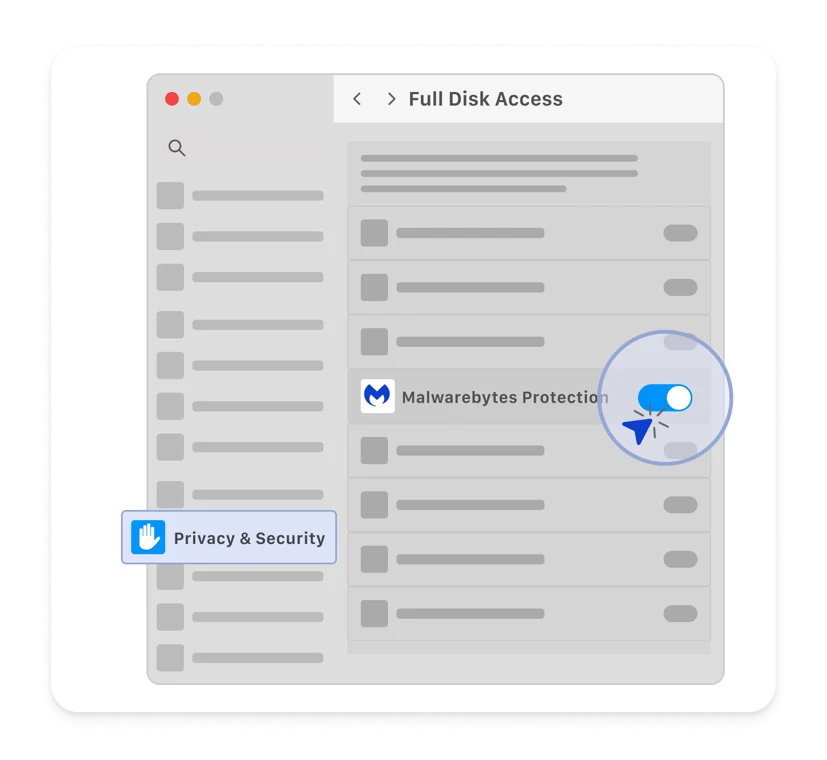
Full Disk Access doesn't make every claim about the product true. It gives the app technical reach; detection quality and privacy practices remain separate questions. Malwarebytes exposes a Usage and threat statistics toggle in General settings, so users who don't want optional telemetry can review that setting independently of required scan access.
The dashboard favors clarity over forensic depth
The Mac dashboard puts the scanner, real-time protection status, Detection History and subscription features into cards. Trusted Advisor turns configuration into a Protection Score and recommendations. That's accessible for a home user because it answers the immediate questions: is protection active, did a scan run, and is a permission missing?
The tradeoff is depth. A security professional may want a richer event trail, clearer file paths and easier exports. Malwarebytes' current Activity log guide says the log records scans, quarantines, license changes, settings, updates and notifications, but older events are deleted after a period to make room for new ones.
Threat, Quick and Custom scans do different jobs
The current scan-type documentation lists Threat Scan, Quick Scan and Custom Scan for macOS. Threat Scan checks common system locations and is the scheduled default for paid users. Quick Scan checks memory and startup programs. Custom Scan lets the user choose a folder, application, directory or drive.
Start with Threat Scan for a general check. Use Quick Scan when the concern is active memory or a startup item and time is limited, then follow a positive result with Threat Scan. Use Custom Scan for a downloaded project folder, an external disk or a location named by another alert. The names describe scope, not confidence percentages.
| Scan | Current Mac scope | Best use | Common misunderstanding |
|---|---|---|---|
| Threat Scan | Locations where threats commonly persist or execute | First general scan and weekly paid schedule | Fast completion doesn't mean the scan was superficial or every file was read |
| Quick Scan | Memory and startup programs | Rapid check for active/startup concerns | A clean Quick Scan doesn't clear every disk location |
| Custom Scan | User-selected folder, app, directory or connected drive | Targeted downloads, work folders and external storage | It isn't automatic scan-on-mount |
| Deep Scan | Windows only in current documentation | Not a Mac option | Windows reviewers often copy the name into Mac advice |
Malwarebytes says Mac scans avoid unchanged files and focus on likely threat locations. That design explains why a Threat Scan can be much faster than a traditional file-by-file sweep. Measure the scan by the defined job and report, not by assuming an hour is inherently safer than thirty seconds.
There's no Malwarebytes Deep Scan on Mac
Deep Scan is documented for Windows, not macOS. This has become a recurring community complaint because users expect every antivirus to offer a button labeled Full or Deep. A May 2026 r/Malwarebytes discussion includes exactly that confusion after a user saw Quick and Custom choices but no conventional full-scan label.
The absence of the label isn't proof that the Mac engine misses every location, and the presence of a “full scan” button on a rival wouldn't prove perfect detection. It does change user control. A person who wants a complete connected-volume sweep must select the relevant location through Custom Scan, then understand that Malwarebytes still applies its own scanning logic.
Malwarebytes can scan an external drive, but not automatically on mount
External-drive selection arrived in the newer Mac scanning engine. The current Custom Scan guide tells a Mac user to open the Scanner card, choose Advanced scans, select Custom scan and pick a location in Finder. A connected SSD or USB volume can therefore be the target.
The current workflow is manual or scheduled around a selected location. We found no Malwarebytes documentation promising that every newly mounted drive is scanned automatically. Macworld's March 2026 hands-on review reached the same practical conclusion: external-drive scanning works, but the reviewer had to initiate Custom Scan and select the drive.
If automatic scan-on-mount is central to your workflow, that's a real product gap, not a minor button preference. If you connect an external drive once a month, a saved calendar reminder or paid schedule may be enough. Value depends on frequency and the cost of forgetting.
Schedules, quarantine, allow lists and reports need a test run
Paid users can schedule Threat, Quick or Custom scans. Malwarebytes' current scan scheduling guide recommends keeping automatic quarantine on and not ignoring potentially unwanted programs. Choose a time when the Mac is normally awake; a perfect schedule is useless if a closed laptop never runs it.
Quarantine isolates files, folders and applications so they can't operate normally. The current quarantine instructions allow a trusted Mac item to be restored and added to the allow list. Restore only after checking the path, publisher and reason for detection. “My tool stopped working” isn't evidence that the file is safe.
Run one harmless test before relying on the workflow. Schedule a scan, confirm it appears in Activity log, export or capture the report, and verify that notifications arrive. Then inspect how a benign test detection or known PUP category is explained. This shows whether the product's level of detail is enough for you while no real incident is underway.
The dedicated 2026 Mac lab report doesn't include Malwarebytes
AV-Comparatives tested nine Mac security products in April and May 2026 on macOS Tahoe with current patches. The participants were Avast, AVG, Bitdefender, CrowdStrike, ESET, Intego, Kaspersky, Norton and Trellix. Malwarebytes was absent. Absence doesn't equal a failed test, because a product that wasn't evaluated has no result to fail.
It does leave a buyer with less independent Mac-specific evidence than several rivals. AV-Comparatives' report covers Mac malware, PUPs, false positives, Windows-malware detection, real-time protection, performance and usability. That breadth is precisely why a current participation result would be valuable.
Windows evidence still tells us something about the vendor's engine, response systems and release discipline. It doesn't tell us how the 5.24 Mac build behaves under Tahoe permissions, what its Mac malware detection rate is, or how its Mac false positives compare. The operating systems, product components and test sets differ.
| Evidence | Platform | What it supports | What it can't prove |
|---|---|---|---|
| AV-Comparatives Mac Test 2026 | macOS Tahoe | Direct comparison for nine participants | No Malwarebytes result because it didn't participate |
| AVLab Product of the Year 2026 | Windows 10/11 and Windows Server | Strong Windows in-the-wild protection history | Malwarebytes for Mac detection or performance |
| AV-TEST Top Product cited by Malwarebytes | Current cited result is Windows | Windows protection, performance and usability | Mac version 5.24 behavior |
| Macworld hands-on samples | Reviewer Mac | Current workflow and one sample-set experience | Population-level detection rate |
Our verdict therefore stays score-free. Malwarebytes may be effective on Mac, and the current feature set is coherent, but the evidence ceiling is lower than it would be with a transparent 2026 Mac lab result.
The 2026 award badges are real, but they aren't Mac scores
The Malwarebytes Mac landing page displays AVLab Product of the Year 2026 and other badges. AVLab's own award explanation says the 2026 Product of the Year evaluation covers Windows 10–11 and Windows Server, based on 2025 Advanced In-The-Wild tests. Malwarebytes Premium earned the recognition; the platform context still matters.
That's positive company-level evidence. It shows the Windows product repeatedly met the lab's criteria and handled a large current threat set. It should appear on a vendor awards page. It shouldn't be converted into “100% Mac detection” or placed beside a Mac verdict without explaining the test environment.
The same rule applies to the June 2026 Malwarebytes article celebrating a 17.5/18 AV-TEST Top Product result. The company itself identifies that as a Windows security test. We can credit the result in the broad Malwarebytes review, where platform scope is explicit, while leaving the Mac evidence cell open.
Mac infostealers and ClickFix attacks make the decision less academic
Microsoft's February 2026 macOS infostealer research describes DigitStealer, MacSync and Atomic macOS Stealer campaigns delivered through fake software, malicious ads, DMG installers and ClickFix-style prompts. The targets include browser credentials, session cookies, keychain data, crypto wallets, cloud access keys and developer secrets.
Malwarebytes is relevant because the paid app adds real-time and web/IP layers, while Browser Guard can block scam and malicious pages. Its threat-research team also tracks Mac campaigns. The review still must resist a heroic promise: a layered product reduces risk; it doesn't make unsafe commands safe.
Fast Mac scans are a design choice, not a universal benchmark
Malwarebytes markets scans “in as little as 30 seconds.” Its help center explains why Mac scans can be fast: they focus on areas likely to contain threats and avoid rescanning unchanged files. That's more useful context than a stopwatch number because storage size, file churn, hardware and scan type change the result.
Macworld's March 2026 reviewer found Quick Scan and a Custom Scan of a heavily used MacBook Pro SSD fast, and noted that newer versions had reduced CPU use. That's credible hands-on evidence from one machine. It isn't permission to invent a sitewide average or promise the same time on an Intel Mac with a nearly full external archive.
During the trial, observe four moments: idle after startup, a normal workday with real-time protection, a Threat Scan, and a Custom Scan of representative storage. Watch Activity Monitor for sustained CPU, memory pressure and disk activity, but also notice fan noise, battery drain, app responsiveness and network behavior. A brief spike is less important than persistent interference.
Browser Guard and desktop Web Protection are separate products
Browser Guard is an extension for Safari, Chrome and Firefox. On Safari, Malwarebytes' current installation guide asks the user to enable its Ad and Tracker Blocker, Malware Blocker and Scam Blocker, then allow access on websites. Those permissions let the extension inspect and block page content.
Desktop Web Protection sits in the Malwarebytes Mac app and covers app- or IP-based destinations, including connections that don't originate in the active browser page. Browser Guard adds browser context, ad/tracker controls and visible site blocks. Turning one on doesn't prove the other is installed, permitted or working.
The permissions are broad enough to deserve reading. Malwarebytes' permission explanation describes access to website data, history, downloads and, on some browsers, clipboard-related protections. Install only the components you'll use and test important banking, work and media sites before committing.
Review telemetry separately from required scan access
Malwarebytes' current Mac General settings guide includes a Usage and threat statistics toggle. It also controls application updates, protection updates, PUP handling, quarantine retention, the menu-bar icon and beta application updates. Review every setting after installation rather than accepting the trial defaults as permanent.
Full Disk Access allows the product to inspect protected locations for its security job. Optional usage statistics are a separate data decision. Browser Guard has another permission surface, and Privacy VPN has another traffic surface. A privacy-conscious buyer should map data by component instead of asking the unhelpful binary question, “Does Malwarebytes collect data?”
Keep automatic application and protection updates on unless a managed environment supplies another update process. Leave beta updates off on a production Mac. For PUPs, quarantine is a safer default than silent deletion because utilities and bundled software can produce judgment calls.
Privacy VPN and identity tools shouldn't decide the antivirus verdict
Malwarebytes Plus adds Privacy VPN. On Mac, enabling it can require endpoint-security extension and network-filter permission. The current VPN setup guide has different instructions for Tahoe 26, Sequoia 15 and older supported releases, which is a useful warning that a major macOS update can disturb low-level networking.
The VPN includes a kill switch and location selection, but it should be evaluated as a VPN. Test reconnect after sleep, Wi-Fi changes, captive portals, video calls and a reboot. A June 2026 community post reported broken VPN behavior after a macOS update; version 5.24 separately lists a fix for a case where turning the VPN on stopped internet access. One report and one fix don't establish a failure rate, but they define a sensible regression test.
Ultimate adds identity monitoring, recovery and Personal Data Remover where eligible. Those services don't strengthen a Mac scan. Our Malwarebytes Privacy VPN review, Identity Theft Protection review and Personal Data Remover review evaluate the separate jobs.
Malwarebytes for Mac value starts with Standard, not Ultimate
In the official US storefront captured July 29, 2026, the three-device individual cards showed Standard at $59.99 a year, Plus at $79.99 and Ultimate at a promotional $139.99. Malwarebytes can also display one-, five- and ten-device configurations, regional pricing and other campaigns. The final checkout is the quote, not a number copied from an old review.
Standard pays for the protection layer and Browser Guard. Plus adds the VPN for $20 in the checked three-device configuration. Ultimate adds identity services and was shown beside a much higher crossed-out comparison price. The exact renewal amount arrives in the account-specific reminder, so don't treat a landing-page strike-through as next year's guaranteed bill.
Our Malwarebytes pricing and renewal guide tracks the device bands, family math, renewal mechanics and refund terms. For a one-Mac buyer, the calculation is simpler: compare the available one-device checkout with the cost of the missing features you may have to buy elsewhere.
Malwarebytes for Mac isn't a full Mac utility suite
The current consumer Mac feature set doesn't document a Malwarebytes firewall, parental controls or cloud backup. It also doesn't promise automatic scanning whenever an external drive is mounted. Reporting is usable for a home user but thinner than a security administrator may want.
| Capability | Malwarebytes for Mac | Decision impact |
|---|---|---|
| Manual malware and PUP scanning | Included in Free and paid | Strong second-opinion use case |
| Real-time malware/app/web protection | Paid/trial | Reason to buy Standard |
| External-drive Custom Scan | Yes, user-selected | Useful but not automatic on mount |
| Firewall/network rules | No dedicated consumer Mac firewall documented | Compare Intego or use macOS controls |
| Parental controls | Not included | Weak family-suite fit |
| Cloud backup | Not included | Keep Time Machine or another backup |
| Rich long-term event reporting | Limited home-oriented history | Test before IT or power-user deployment |
A missing checkbox matters only when it serves your use. Don't buy a bloated suite to obtain a feature you'll never configure. Don't buy Malwarebytes for simplicity, then discover that the one missing control was the reason you wanted a suite.
Known 2026 Mac issues are usually permission or update boundaries
The 5.24 release note fixed VPN connectivity and a missing Web Protection banner. Older 5.x notes document problems around system-extension permissions, Web Protection after reboot, activation and notification behavior. That pattern isn't unique to Malwarebytes; security extensions sit close to macOS controls that Apple changes between major versions.
When a protection tile becomes inactive after an update, check the app version, macOS version, Full Disk Access and endpoint/network extensions before reinstalling. Export or capture the Activity log and exact error. A blind reinstall can temporarily fix the surface while erasing the chronology that support needs.
If the app must be removed, use Malwarebytes' own uninstall path, then verify no relevant extension or Full Disk Access entry remains. Our complete Malwarebytes uninstall guide covers the current Mac and Windows removal paths and the vendor support tool.
Current Mac users split between “great scanner” and “too much suite”
A June 2026 r/Malwarebytes feedback thread captures the tension. Several long-time users wanted the old minimal scanner experience, while a Malwarebytes employee said the free scanner still matters and explained the push toward browser, scam and identity protection. That's useful product-direction evidence, not a poll of all customers.
Current r/mac and r/MacOS discussions frequently recommend Malwarebytes Free when someone wants to check a suspicious Mac, while other commenters prefer Apple’s built-ins and cautious download habits. A July 2026 r/mac troubleshooting thread again surfaced Malwarebytes as a manual scan option. The consensus isn't “everyone should subscribe.”
Choose a Malwarebytes alternative by the missing job
Intego is the first alternative when you want a Mac-first suite with explicit firewall/network controls. It participated in the 2026 AV-Comparatives Mac test, though its result wasn't the strongest in every category. Mac specialization doesn't remove the need to compare evidence and price.
Bitdefender is the cleaner alternative when current independent Mac testing matters more than Malwarebytes' simple scanner identity. It also offers a mature cross-platform household ecosystem. Our Bitdefender versus Malwarebytes comparison covers the broader tradeoff; verify that the Mac-specific features you want exist in the chosen Bitdefender tier.
Norton is stronger when a household wants a wider suite and centralized device coverage. It also appeared in the 2026 Mac test. The cost is more bundle complexity and renewal management, which the Malwarebytes versus Norton comparison makes visible.
| Main need | Best starting comparison | Why |
|---|---|---|
| Fast manual second opinion | Malwarebytes Free | Simple, current and familiar cleanup workflow |
| Mac-first firewall and suite controls | Intego | Mac-centered design and explicit network layer |
| Current dedicated Mac lab participation | Bitdefender, Norton, ESET, Avast/AVG, Intego or Kaspersky | All appeared in AV-Comparatives' 2026 Mac report |
| Broader household bundle | Norton or Bitdefender | More adjacent family and platform features |
| No additional always-on agent | Apple built-ins plus disciplined habits | Valid for lower-risk users who maintain the platform and backups |
Who should buy Malwarebytes for Mac, keep Free or skip it
Buy Standard when the Mac routinely installs software outside the App Store, the owner wants uncomplicated automatic protection, and the trial shows all three real-time layers remain active without disrupting work. It's also reasonable for a family that already trusts Malwarebytes and can use several device seats.
Keep Free when you want a manual cleanup and second-opinion scanner but already have satisfactory real-time protection or a low-risk Apple-only workflow. Update before each scan, and remember that a clean manual result is a point-in-time check rather than ongoing monitoring.
Choose Plus only when Privacy VPN replaces a service you'd otherwise pay for and passes sleep, reboot, Wi-Fi and performance tests on your Mac. Choose Ultimate only when the identity package itself is worth the added cost for an eligible person. Neither tier turns Windows lab results into Mac evidence.
Skip Malwarebytes when you need a dedicated Mac firewall, parental controls, automatic external-drive scanning, deep forensic reporting or a product with current independent Mac-test participation. Those are requirement mismatches, not insults to the scanner.
Use the 14-day trial as a Mac compatibility test
Don't spend the trial watching a Protection Score sit at 100. Use it to test the conditions that cause real disappointment: permissions after reboot, a major macOS update, sleep and wake, an external drive, Browser Guard on essential sites and VPN reconnection if Plus is under consideration.
| Period | Test | Pass condition | Red flag |
|---|---|---|---|
| Day 1 | Install from official site; record version and permissions | Verified app, expected grants, all paid tiles active | Unknown installer, unexplained duplicate extensions |
| Days 2–3 | Threat and Quick scans; inspect reports | Clear scope, paths, actions and usable history | Opaque detections or missing records |
| Days 4–5 | Custom Scan a representative external drive | Drive selectable, scan completes, result is understandable | Drive unavailable or workflow too easy to forget |
| Days 6–8 | Normal work, video calls, builds and battery use | No sustained slowdown or recurring permission prompt | Persistent CPU, memory, fan or disk pressure |
| Days 9–10 | Browser Guard on essential sites | Useful blocks without unacceptable breakage | Frequent false positives or overly broad allow-list needs |
| Days 11–12 | Sleep, reboot, update check and scheduled scan | Protections remain active and schedule is logged | Web/VPN tile disappears or extensions turn off |
| Days 13–14 | Price, renewal and alternative comparison | Standard or bundle solves a named need at a known cost | Purchase justified only by a badge or trial countdown |
Save the final account and renewal state. Malwarebytes advertises a 60-day guarantee for eligible direct personal purchases, but cancellation and refund are separate actions and third-party stores have their own rules. Our cancellation and refund guide explains the safe merchant-specific routes.
Final verdict: excellent second opinion, qualified paid recommendation
Malwarebytes for Mac earns its place as a fast, approachable scanner. The current app also deserves more credit than the “cleanup tool only” label: paid users get real-time malware and app protection, desktop Web Protection, schedules, quarantine, activity history and user-selected external-drive scanning.
We would recommend Standard to a user whose behavior creates a clear need for that automatic layer and whose trial passes the permission and performance checks. We would keep Free for occasional second opinions. We wouldn't recommend upgrading to Plus or Ultimate merely to improve Mac malware detection, because those tiers primarily add VPN and identity services.
The limit remains independent Mac evidence. Malwarebytes didn't participate in AV-Comparatives' dedicated 2026 Mac test, while several direct alternatives did. Its Windows awards are genuine and positive, but they're Windows evidence. A careful review should leave that distinction visible rather than laundering it through a star score.
Malwarebytes for Mac FAQ
Is Malwarebytes good for a Mac in 2026?
Yes for fast manual cleanup and simple paid real-time protection, especially on Macs that install apps outside the App Store. The caution is independent proof: Malwarebytes didn't participate in AV-Comparatives' dedicated 2026 Mac test, so its current Windows awards aren't Mac detection scores.
Do Macs need Malwarebytes if they already have XProtect?
Not every Mac needs a paid third-party antivirus. Apple already supplies Gatekeeper, Notarization and XProtect. Malwarebytes can add an on-demand second opinion, real-time app and web layers, schedules and clearer user-facing scans. The value depends on download habits, risk and whether those extras solve a real gap.
Is Malwarebytes Free enough on Mac?
It's enough when you want an occasional manual scanner and already rely on maintained real-time protection elsewhere. Free doesn't include Malwarebytes real-time protection or scheduled scans, so it shouldn't be described as the same paid product with fewer conveniences.
Why does Malwarebytes need Full Disk Access on Mac?
Malwarebytes says Full Disk Access is required for its real-time Malware Protection and App Block layers to inspect protected locations. Grant it only to the verified Malwarebytes application, confirm the protections become active, and remove the permission if you uninstall or stop trusting the app.
Does Malwarebytes for Mac have a full or Deep Scan?
The current Mac app offers Threat, Quick and Custom scans. Malwarebytes documents Deep Scan as Windows-only. A Mac Threat Scan focuses on locations likely to contain threats, while Custom Scan lets you select a folder, application, directory or connected drive.
Can Malwarebytes scan an external drive on Mac?
Yes. Open the Scanner card, choose Advanced scans and Custom scan, then select the connected drive in Finder. Current documentation doesn't describe an automatic scan whenever a drive is mounted, so the user must initiate or schedule the selected scan.
Does Malwarebytes slow down a Mac?
A typical targeted Mac scan can be brief because the engine focuses on likely threat locations and avoids unchanged files. That isn't a universal benchmark. Resource use depends on the scan scope, storage, Mac model, other extensions and current app version, so test it during real work before buying.
Is Malwarebytes Browser Guard included on Mac?
Browser Guard is available for Safari, Chrome and Firefox and is presented as a separate browser extension. Its browser permissions and controls are separate from the paid desktop Web Protection layer. Test site compatibility and use the allow list only for domains you trust.
Does Malwarebytes for Mac include a firewall?
No dedicated Malwarebytes Mac firewall is documented in the current consumer feature set. macOS has its own application firewall, while suites such as Intego provide a more explicit network-control layer. Malwarebytes also lacks parental controls and cloud backup.
Which macOS versions does Malwarebytes support?
The stable requirements page currently lists macOS Big Sur 11, Monterey 12, Ventura 13, Sonoma 14, Sequoia 15 and Tahoe 26. Version 5.24 notes support for macOS 27 beta, but beta compatibility shouldn't be treated as the stable support floor or a guarantee of bug-free operation.