
Malwarebytes Mobile Security Review 2026: Android vs iOS
On Android, Malwarebytes is an antivirus scanner. On an iPhone, it can't scan the operating system or other apps. That difference changes what the same subscription is actually buying.

Quick answer: Malwarebytes Mobile Security is a credible Android scanner with a useful free manual mode, paid real-time protection and positive MRG Effitas certification. It isn't independently represented in the two broad 2026 Android comparisons we checked, so the evidence is narrower than the marketing suggests. On iPhone and iPad, Malwarebytes isn't an antivirus scanner at all: Apple's sandboxing prevents that job. The iOS app instead filters malicious web destinations, Safari ads, unknown texts and calls, and adds Scam Guard, VPN or identity tools by feature and plan. Android users who sideload or receive risky APK links have the stronger antivirus case. iPhone users should buy only when the web, text, call or bundle features solve a specific need.
Malwarebytes Mobile Security verdict at a glance
Malwarebytes Mobile Security isn't one review wearing two phone-shaped costumes. The Android app can inspect installed packages and files, run manual and scheduled scans, quarantine or remove detections and add paid real-time protection. The iPhone and iPad app can't inspect the operating system or other apps. It works around that boundary with Safari filtering, malicious-site blocking, ad and tracker controls, text and call screening, Scam Guard and optional VPN or identity services.
On Android, our verdict is cautiously positive. The free scanner is useful, the paid product covers real mobile-malware use cases, and Malwarebytes earned certification in the latest MRG Effitas Android report we could verify. The evidence isn't comprehensive: Malwarebytes didn't appear in AV-TEST's March or May 2026 Android lineups or AV-Comparatives' 2026 Mobile Security Review. That's a current proof gap, not a failed test.
On iOS, “antivirus” is the wrong buying question. Malwarebytes can reduce exposure to malicious links, spam calls, suspicious texts and Safari trackers, but it can't tell you that every app and system file is clean. A person who mainly wants free ad and text filtering may find the app useful. Someone paying solely for an iPhone virus scan will be buying a capability the product doesn't have.
| Question | Android | iPhone and iPad |
|---|---|---|
| Device-wide malware scan? | Apps and files can be scanned | No; iOS doesn't permit it |
| Useful free mode? | Yes, especially for manual scanning | Yes for ad, text and Scam Guard features in the current matrix |
| Reason to pay? | Real-time, ransomware and safe-browsing protection | Web or Call Protection, VPN or bundle services |
| Current independent evidence? | MRG Effitas certification; gaps in two broad 2026 lineups | No comparable consumer malware-scanner test because the app can't scan iOS |
| Best fit | People who sideload, receive APK links or want a second Android engine | People who want scam, Safari, text or call filtering |
Android and iOS are different products under one name
The easiest way to misunderstand Malwarebytes Mobile Security is to read the combined name before reading the operating-system column. Android exposes installed-package and file information that allows a security app to identify known malicious software and warn during the download or installation path. iOS isolates third-party apps much more tightly. A security app can use Apple-approved extensions and services, but it can't roam through every other app's files.
This is why the Android dashboard has a Scanner card and an Allow list, while the current iOS dashboard surfaces Web Protection, Call Protection, Ad Blocking and Text Message Filtering. Both apps also show Scam Guard, Trusted Advisor, account features and VPN eligibility. The current official mobile Quick Start Guide documents these separate setup paths; the shared cards don't make the underlying protection engines equivalent.
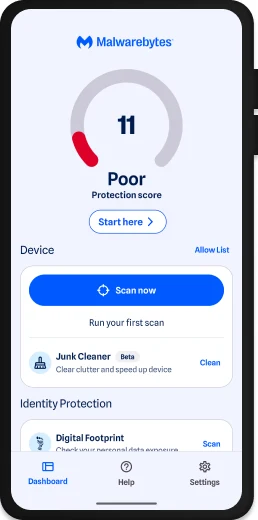
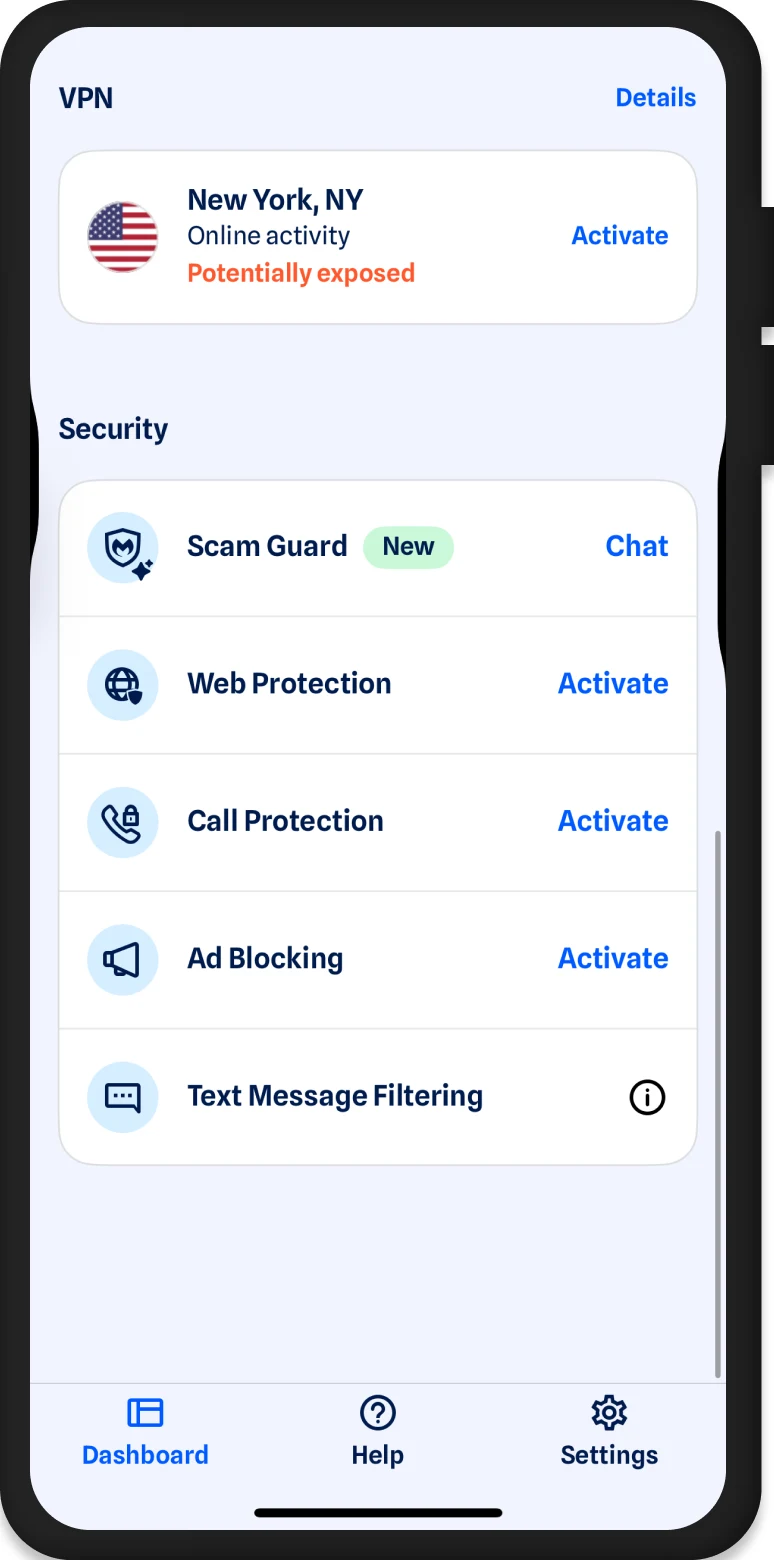
The split also changes how we score value. An Android buyer can ask whether Malwarebytes catches dangerous APKs early enough and whether background protection justifies the battery cost. An iOS buyer should ask whether Safari, message and call filters catch enough nuisance and fraud attempts without creating privacy or compatibility problems. Our main Malwarebytes review covers the whole brand; this page keeps the mobile operating systems honest.
What changed in the current Android and iOS releases
Malwarebytes for Android 5.26 was released July 23, 2026. It refreshed the scanner design, improved text-permission and upgrade messaging, added Android 17 support and fixed an issue that prevented scheduled scans from completing properly. The timing matters because a current Reddit complaint about an unusually long scan appeared shortly before this release; the note proves a scheduled-scan fix, but it doesn't claim that every long manual scan had the same cause.
Malwarebytes for iOS 5.26 was released June 11, 2026. It refreshed the interface, improved interactions and fixed a black screen or infinite spinner after reinstalling while previously signed in. General backend, localization and Trial Summary Report fixes round out the note.
These version numbers are coincidentally the same, not evidence of feature parity. Android 5.26 is a scanner release with Android 17 support. iOS 5.26 is primarily a design and reliability release. A useful mobile review must follow the release notes separately rather than treating “version 5.26” as one cross-platform build.
Supported phones, tablets and operating systems
The current mobile requirements page lists Android 9 through Android 17. It lists iOS and iPadOS 17, 18 and 26. An active internet connection is required for installation, cloud-backed checks, account functions and updates.
Malwarebytes v5 isn't supported on ChromeOS, even though some Chromebooks can install Android apps. That restriction is easy to miss because Google Play may make an app visible on devices that aren't part of the vendor's supported test surface. Use our Chromebook security guide for that platform rather than forcing the Android app into an unsupported role.
| Device | Current support | Important boundary |
|---|---|---|
| Android phone or tablet | Android 9–17 | Permissions and manufacturer battery controls can affect protection |
| iPhone | iOS 17, 18 and 26 | No device-wide malware scan |
| iPad | iPadOS 17, 18 and 26 | No Call Protection in the current free/paid matrix |
| Chromebook | Mobile v5 not supported | Android app availability doesn't create official support |
| Older operating system | Outside the current list | Update the OS before trusting a security app |
The current feature matrix makes the platform split visible
The July 2026 official free-versus-paid matrix is more useful than a marketing bundle card. Android receives Scanner, Real-Time Protection, Ransomware Protection, Safe Browsing Scanner, SMS Protection and Scam Guard. iOS receives Web Protection, Call Protection, Ad Blocking, SMS Protection and Scam Guard. iPadOS omits Call and SMS Protection in that matrix.
The matrix also corrects a common purchase mistake. Android's manual Scanner is free, while its always-on malware, ransomware and safe-browsing layers are paid. On iOS, Ad Blocking and Text Message Filtering are currently free, while Web and Call Protection are paid. Scam Guard is listed as free on all three mobile columns.
| Capability | Android | iOS | iPadOS |
|---|---|---|---|
| Manual malware scanner | Free | Not available | Not available |
| Real-time/ransomware protection | Paid | Not available as an antivirus layer | Not available as an antivirus layer |
| Safe-browsing scanner | Paid | Separate Web Protection is paid | Separate Web Protection is paid |
| Ad Blocking | Not listed in the current mobile matrix | Free | Free |
| Call Protection | Not listed | Paid | Not listed |
| Text/SMS protection | Free | Free | Not listed |
| Scam Guard | Free | Free | Free |
Plan names and bundles can still change by store, region and campaign. Check the live entitlement screen before paying, then use our Malwarebytes pricing and renewal guide for device counts, renewal handling and cancellation boundaries. A feature matrix is the product truth; a discount card is only the current sales offer.
The Android scanner checks apps and files, then asks for a decision
The current Android scan guide says Scanner looks for ransomware, malware, adware, spyware and potentially unwanted programs. A first scan can request storage access so it can inspect both apps and files. The results show the number of items scanned, elapsed time and any detections.
A detected item isn't silently turned into a universal verdict. Malwarebytes offers Ignore once, Always allow and Delete file or Uninstall app. Ignore once leaves the item available to be detected again. Always allow excludes it from future scans and should be used only after the file, publisher and reason for detection have been reviewed. Delete or Uninstall is the removal path for something you have decided is malicious.
Potentially unwanted programs deserve that extra judgment. An aggressive ad-supported utility or tracking-heavy installer may not behave like a banking Trojan, but its privacy cost can still conflict with the user's intention. Conversely, an unusual administrative or testing tool can trigger a policy-based classification without being malicious. The Allow list is useful because it exposes that decision, but it can also preserve a threat if the user clicks through too quickly.
A clean scan is a point-in-time result. It doesn't prove that a password was never phished, that an account session is safe, or that a risky app will never change behavior after an update. When the concern is a suspicious APK, scan before opening it, keep the result, and verify the package source. When the concern is a stolen account, move immediately to credential and session recovery rather than waiting for a phone scan to solve an identity problem.
Paid Android protection watches the risky moments that manual scans miss
The paid Android column adds Real-Time Protection, Ransomware Protection and Safe Browsing Scanner. The current Malwarebytes Android product page positions those layers against risky downloads, phishing and unwanted apps. They matter most before a harmful app is launched or a malicious page collects credentials. A manual scanner can discover a dangerous package later, but Android malware that receives Accessibility, overlay, notification or device-administrator rights can become difficult to remove after execution.
MRG Effitas separates detection during download, before installation and after installation for exactly this reason. The lab counts a warning before first launch as protection, but it also says earlier detection is better for the user. Paid background protection is therefore not simply a scheduled version of the free button; its value is an earlier intervention point.
Don't grant Malwarebytes every Android permission without reading the associated job. Storage access supports file scanning. Notification access lets the app surface warnings. Web or text protection may need broader observation. Android manufacturers can also suspend background work aggressively, so a protection tile that looked active during setup may not behave the same after days of battery optimization.
After installation, use a harmless industry test page or the app's own status checks rather than downloading live malware. Confirm the warning arrives, the protection service survives a reboot and the operating system isn't showing Malwarebytes as restricted. The goal is to test configuration, not to turn a personal phone into an uncontrolled malware lab.
Android scan settings trade coverage, time and battery
Paid and trial users can schedule scans daily or weekly and select the time and days. Android scanning settings can also trigger a scan after reboot or after a protection-database update. These options are useful for a phone that receives work files or sideloaded packages, but scheduling every possible trigger can create redundant work.
Use deep scanner during a full scan when the risk justifies more time. Malwarebytes says this adds deeper rules and full scans of system apps. It isn't a magic certainty switch, and it can lengthen the scan. Start with the standard scan for routine checks, then use deep scanning after a suspicious install, unexplained behavior or a credible exposure.
Power saving scans skip work when the battery is low or the phone is in power-saving mode. Charge-only scans postpone automatic work until charging. The vendor documentation currently describes the charge-only toggle as postponing scans when the device is charging, which appears internally inconsistent with the setting name; treat the label in the live app as authoritative and verify the actual behavior after the next schedule.
That small documentation ambiguity is a good reason to inspect the activity rather than assuming a schedule ran. Check the last-scan time, duration and item count. Android 5.26 fixed a scheduled-scan completion issue, so a user upgrading from an earlier build should run one manual scan and observe the next scheduled event before treating automation as reliable.
Android permissions are part of the protection model
A mobile antivirus doesn't receive desktop-level visibility by default. Android exposes data through defined permissions and APIs, and the app must remain alive enough to inspect or warn. Malwarebytes may request access for scanning files, sending alerts, protecting browsing or evaluating messages. Refusing a permission can disable the corresponding tile without making the rest of the app fraudulent.
The better question is whether each grant matches the feature you turned on. A free user who wants only an occasional app-and-file scan may not need the same background and message access as a paid user enabling every layer. Review Android's permission dashboard after setup and remove unused access. If a tile then stops working, decide whether the feature is worth restoring the permission.
Accessibility deserves special care because Android banking malware also abuses it. If Malwarebytes or another security app asks for an accessibility-related service, verify the exact current vendor instruction and app identity before enabling it. Never follow a text message or pop-up that directs you to grant a newly downloaded “security” app accessibility rights.
Our Malwarebytes installation guide covers the supported activation paths. On Android, install from the verified Google Play listing linked by Malwarebytes, not an APK mirror. A security app that arrives through an unverified package defeats the trust decision before the first scan begins.
Malwarebytes supplements Google Play Protect; it doesn't replace it
Google Play Protect checks apps from Google Play and other sources. It can warn about a harmful app or URL, block an installation, remove a known harmful app and request a code-level evaluation for an unfamiliar app installed outside Play. It also receives device, app and potentially harmful URL information under Google's documented process.
MRG Effitas disables Play Protect during antivirus tests so the third-party product's result isn't contaminated by Google's intervention. That's valid laboratory isolation, not advice for a home user. Keeping both layers active gives two separate sources of reputation and detection, although overlapping warnings may occasionally require interpretation.
If Malwarebytes and Play Protect disagree, don't tap through both warnings from habit. Record the package name, developer, source and exact detection. Remove the app if it came from an unsolicited link or fake store. For a trusted business app, ask the publisher for a signed current build and submit a false-positive report before adding a permanent exception.
Android users who install only from Play still face phishing, malicious web destinations and occasional harmful apps, but sideloading increases the need for an additional early-warning layer. Our best Android antivirus guide compares Malwarebytes with products that also appeared in the current broad lab lineups.
Malwarebytes can't scan an iPhone for malware
Malwarebytes says this directly in its iOS product FAQ: a malware scanner isn't available because an iOS app can't perform that scan. The current App Store description repeats the limitation. This isn't a missing premium entitlement and can't be fixed by granting more photos, contacts or network permissions.
Apple's current app-security overview describes centralized distribution, code signing and strict sandboxing on iPhone and iPad. Its runtime security documentation says every third-party app is sandboxed and can access information outside its own container only through services explicitly provided by iOS. Those controls are why a third-party app can't inspect every other app as a Windows scanner does.
The boundary is protective, but it doesn't make iPhone owners immune to phishing, stolen sessions, malicious configuration profiles, scam calls or sophisticated targeted spyware. Malwarebytes addresses the first group through approved web, call, text and scam surfaces. It can't certify that a high-risk targeted device is clean. A person who receives an Apple threat notification or has a credible mercenary-spyware concern needs Apple's current guidance and specialist incident response, not a consumer App Store scan.
For ordinary buyers, the practical question is narrower: do the approved filters reduce the scams and nuisance that reach you? Our iPhone security guide explains why products in this category should be compared on web, identity, privacy and account features rather than imaginary iOS detection percentages.
iOS Web Protection and Ad Blocking work through Safari extensions
Malwarebytes describes Web Protection and Ad Blocking as Safari browsing layers that block malicious sites, ads and trackers. Web Protection is paid in the current matrix; Ad Blocking is free. The features depend on iOS extension settings, so installing the app doesn't necessarily mean the extensions are active.
Open the Malwarebytes dashboard, activate the intended feature, then verify the corresponding entries under Settings, Apps, Safari and Extensions. Test a known-safe vendor test page and a normal selection of banking, shopping and publishing sites. A content blocker can protect and still break a login, checkout or embedded video, so the evaluation needs both a block test and a compatibility test.
Safari coverage isn't a universal tunnel around every app. Links opened inside another application's webview or traffic generated by native apps may follow different paths. The paid VPN can protect transport on untrusted networks, but a VPN doesn't decide whether a destination is a scam. Keep the jobs separate: Web Protection evaluates destinations, Ad Blocking filters Safari content, and VPN encrypts network traffic to its server.
Malwarebytes also promotes Browser Guard on desktop platforms, but the mobile matrix and iOS dashboard are the authoritative source for this app. Our Malwarebytes Browser Guard review covers the browser extension's wider desktop behavior without importing those results into iPhone Safari.
iOS Call Protection and Text Message Filtering address scams, not device malware
Call Protection is a paid iPhone feature in the current matrix and isn't listed for iPadOS. Its job is to identify or block known fraudulent and nuisance numbers through Apple's call-identification framework. A new spoofed number can still get through, and a legitimate organization can be mislabeled. Treat the label as a warning to verify the caller through a trusted channel, not as proof of identity.
Text Message Filtering is listed as free for iOS. Under Apple's message-filtering model, messages from senders who aren't in Contacts can be classified and moved to a spam section. That can reduce exposure to phishing links without deleting the user's ability to review a message later.
Neither feature stops a person from voluntarily sharing a code, password or payment after a convincing conversation. Banks, delivery services and government impersonators exploit urgency more effectively than technical malware in many mobile incidents. The safest response is to close the message or call and open the known official app or phone number independently.
Message and call filters also require a review of false positives. Add important medical, school, delivery and work contacts where appropriate, then inspect the filtered folders during the trial. A filter that hides a critical legitimate message creates a different kind of risk, even if its scam database is strong.
Scam Guard is an assistant, not an oracle
Scam Guard is an AI-powered chat feature available on Android, iOS and iPadOS. The user can share text, a link, an email description or a screenshot. Malwarebytes says the system analyzes the content, checks protection databases and returns recommendations.
The feature is most useful as friction before a risky tap. A suspicious delivery message can be pasted or captured without opening its link. The answer can highlight urgency, impersonation, a mismatched domain or a request for credentials. That's better than deciding inside the attacker's conversation.
It still needs human verification. An AI assistant can miss a new campaign or misread a legitimate but unusual message. Don't upload secrets, one-time codes, full payment cards, recovery phrases, medical records or identity documents merely to obtain reassurance. Redact what isn't needed for the scam pattern.
After Scam Guard marks a phone number, email or message as suspicious, it may ask whether the user wants to submit the item to the threat-intelligence team. That's a separate choice from asking the chatbot. Our Malwarebytes Scam Guard review examines the workflow, privacy questions and limits in depth.
Text protection sends message data to a Malwarebytes server
The current text-protection privacy article is unusually specific. Malwarebytes says the processing server for both platforms is in Paris, France. It documents TLS 1.2 connections with modern ciphers and SHA2-or-better certificates.
The platform behavior isn't identical. On iOS, Apple's filtering process sends messages from people who aren't in Contacts. On Android, Malwarebytes says it sends all numbers, including numbers in Contacts, to its server for checking. In both cases, the sender and message body are the data elements described; Malwarebytes says recipient identity, phone number and Apple ID aren't provided with the filtered message.
If a message is classified as malicious, Malwarebytes says the sender and body are also sent to a separate secured telemetry server to improve protection. Messages that aren't malicious are described as immediately deleted and not stored. That's a vendor-stated handling policy, not a local-only filter.
The decision is therefore personal and contextual. A user receiving ordinary retail scams may accept server-side analysis for better classification. Someone handling confidential client, legal, medical or source communications may decide not to enable it, especially on Android where contacts aren't excluded from number checking. Free doesn't mean costless; the relevant cost here is the processing model.
Trusted Advisor measures configuration, not malware probability
The Trusted Advisor card gives the device a Protection Score based on available Malwarebytes features and settings. Enabling a recommended layer raises the score; disabling one lowers it. The dashboard can label the configuration from Poor through Excellent.
A 100 percent score means the app's available capabilities are enabled for that subscription. It doesn't mean the phone has a 100 percent chance of blocking every attack, and it isn't an independent lab score. A user can also ignore a recommendation that doesn't fit the device, which moves it out of the active issue list.
Use the score as a setup checklist. If Web Protection is paid but inactive on iOS, the card can lead to the missing extension. If an Android scan has never run, it can prompt the first check. Don't buy a higher tier merely to make a gauge green unless the added feature solves a risk you actually have.
Malwarebytes Mobile Free and paid solve different jobs
On Android, Free is a real manual security tool. It can scan apps and files and act on detections. Paid access changes the timing by adding always-on malware and ransomware protection, safe-browsing protection and scan scheduling. The upgrade is justified when exposure happens between manual checks or when the user is unlikely to remember to scan.
On iPhone, the free value isn't a malware scan. Current documentation lists Ad Blocking, Text Message Filtering and Scam Guard as free. Web Protection and Call Protection are paid. A person who mostly wants fewer Safari ads and suspicious-message sorting can test free before entering a trial.
The mobile app can also surface broader Standard, Plus or Ultimate services. Those tier names describe a bundle, not a stronger mobile detection engine at every step. Plus usually adds VPN capability, and Ultimate adds identity-related services where eligible. Our Malwarebytes Free versus Premium comparison owns the full cross-platform matrix.
Store purchases, direct subscriptions and multi-device accounts can restore differently. Record which merchant charged you, which email owns the subscription and how many seats are available. If activation fails, the merchant and entitlement matter more than reinstalling the scanner repeatedly.
VPN and identity features should be judged as separate products
Malwarebytes currently says Standard mobile users can receive limited VPN data, while Plus is required for unlimited data. Enabling the VPN creates an Android connection request or installs an iOS VPN configuration. A VPN encrypts traffic to the chosen server and masks the public IP address, but it doesn't remove malware from an Android app or turn an iPhone into a scanner.
Test the VPN on Wi-Fi and cellular, after sleep, after a network change and during a video call. If it fails, the current mobile VPN troubleshooting page starts with device, router and network checks. Our Malwarebytes Privacy VPN review examines protocol, privacy, speeds and value separately from antivirus protection.
Digital Footprint Scan and identity products can find exposed personal data, monitor certain records or assist after identity theft according to tier and eligibility. Those can be valuable, but they solve an account and identity problem. The Malwarebytes identity-protection review and Personal Data Remover review cover the claim boundaries.
Don't let bundle breadth erase platform weakness. A plan with VPN, identity monitoring and an AI chat can still have incomplete Android lab coverage. Conversely, an iPhone plan can be useful without an antivirus scan if the buyer genuinely needs scam and privacy controls. Price each job, then keep only the services that earn their renewal.
MRG Effitas gives Malwarebytes positive Android evidence
The Malwarebytes Android product page currently says it won the Android 360 award and detected all malware samples in the linked third-party test. Its footnote points to the MRG Effitas Q2 2025 report. That report tested Android 14 emulator images and physical Pixel devices in June and July 2025 with Google Play Protect disabled.
In the report's non-PUA set, Malwarebytes recorded a 0.00 percent miss rate. It also detected all five custom simulator samples. The separate PUA table shows a 16.67 percent miss rate for Malwarebytes, which explains why “all malware” shouldn't be silently expanded into “every unwanted app.” All products passed the limited five-app false-positive set.
A newer Q4 2025 Android 360 report, published with 2026 copyright, tested physical Pixel devices on Android 16. It began with 157 in-the-wild malware samples, five custom simulators and five benign apps. Malwarebytes again appeared among the products awarded the certificate for a rounded non-PUA miss rate no higher than one percent.
The certificate is meaningful current Android evidence. It isn't proof of perfect detection forever, and the tiny false-positive set can't predict behavior across the whole Play ecosystem. The most useful part of the methodology is timing: warnings during download, before installation and after installation are recorded separately, because an app can become much harder to remove after first launch.
Malwarebytes is missing from two broad 2026 Android comparisons
AV-TEST's March 2026 Android test covered 11 products, and the May 2026 round covered 12. Malwarebytes wasn't listed in either lineup. Its vendor archive currently shows July 2020 as the latest Malwarebytes Android result. That old score shouldn't be presented as evidence for version 5.26.
The AV-Comparatives Mobile Security Review 2026 tested nine products on Android 16 using 3,156 malicious APKs, 500 clean apps and battery/usability checks. Malwarebytes wasn't a participant. The lineup included Google Play Protect and several direct paid competitors.
Non-participation doesn't mean Malwarebytes failed. It means the current comparison set is narrower: positive MRG Effitas certification, no fresh AV-TEST entry and no place in the 2026 AV-Comparatives review. A buyer who prioritizes repeated, multi-lab Android participation may prefer Bitdefender, Norton, Avast, AVG, Avira or another product present in both broad rounds.
Windows evidence stays out of this calculation. Malwarebytes' current Windows awards can be genuine and still say nothing direct about Android package detection, background-service behavior or iOS extensions. Our Bitdefender versus Malwarebytes and Malwarebytes versus Norton comparisons make the platform evidence visible.
Performance depends on scan scope, phone and background policy
A manual Android scan reads package and file information and may consume CPU, storage bandwidth and battery. Deep scanning and system-app coverage increase the work. A modern phone with modest storage can finish quickly, while a device with many files, photo-provider integrations or slow storage can take longer. One reviewer's stopwatch isn't a universal benchmark.
Measure three things during the trial: active scan time, battery change and normal responsiveness. Then measure the paid background service across several ordinary days. Android's battery screen can show whether Malwarebytes consumes meaningful power while idle. A large one-time scan cost may be acceptable; persistent unexplained background drain is a reason to change settings or choose another product.
On iOS, the app isn't reading every file, so the more relevant tests are Safari page load, extension compatibility, message classification and VPN impact. An ad blocker can make some pages faster while a VPN adds latency. Test the exact combination you plan to leave enabled rather than toggling every feature for an artificial benchmark.
Keep versions and conditions with any measurement. Android 5.26 changed the scanner and fixed scheduled-scan completion. iOS 5.26 changed UI and reliability. A number from an older Mobile Security review based on a much smaller app isn't a trustworthy prediction for the current suite.
Known Android issues center on long scans, schedules and activation
A July 2026 r/Malwarebytes thread describes a scan running for more than seven hours and appearing stuck around a Google photo-picker component. Another user said a normal scan took about six minutes, and official Malwarebytes support requested logs. This is a credible troubleshooting signal, not evidence that most phones hang.
If a scan appears stuck, note the current item, elapsed time, app version, Android version and whether the device is charging or under battery restriction. Stop only after preserving the details. Update to 5.26, reboot, run a standard manual scan and send logs if the same item stalls again. Avoid clearing data or reinstalling before support has the evidence.
Version 5.26 explicitly fixed scheduled scans that didn't complete correctly. After upgrading, verify one scheduled event in the activity history. If a manual scan still takes hours, the release-note fix may not apply. The distinction prevents a plausible but unverified diagnosis.
Activation can also fail when the Google account has no matching purchase, the direct subscription has no available seat, an MB code expired or an account setup is incomplete. Malwarebytes' current mobile error guide maps each message to a merchant or account action. Use the exact message rather than buying a second subscription.
iOS 18+ can hide the extensions Malwarebytes needs
The current iOS extension troubleshooting article says a hidden or Face-ID-locked Malwarebytes app can hide its extension permissions in Settings. Screen Time, Content & Privacy Restrictions and web-content controls can also stop Web Protection, Ad Blocking and Safari Protection from being enabled.
The vendor's resolution is to remove the Face ID requirement from the Malwarebytes app, set incompatible Web Content restrictions to Unrestricted, and then enable Malwarebytes Web Protection and Ad Blocking under Settings, Apps, Safari and Extensions. That tradeoff matters on a child's device: disabling parental web restrictions merely to enable another filter may not be the right policy.
iOS 5.26 fixed a black screen or infinite spinner after reinstalling while previously signed in. For an app that won't open, Malwarebytes recommends restarting, deactivating the device in the account, uninstalling and reinstalling, then contacting support if the problem remains. Preserve subscription details before removal.
VPN connection failures are a separate path. Test the underlying Wi-Fi or cellular connection without VPN, then restart the device and network equipment where appropriate. Don't remove Safari filters to troubleshoot an unrelated VPN server unless the evidence points there.
Current users still disagree about what Malwarebytes should be
A June 2026 r/Malwarebytes discussion captures the brand tension. Some long-time users want the simple scanner they remember, while company representatives explain the move toward phishing, scam, browser and identity protection. Mobile is where that strategy is most visible.
The disagreement isn't automatically a product flaw. Mobile fraud often arrives through messages, browsers and social platforms rather than a classic executable. Scam Guard and filtering target that reality. The criticism becomes relevant when broader features obscure the free scanner, complicate activation or make users pay for a bundle they didn't want.
Current Android threads also contain confident but conflicting claims about whether mobile antivirus is useful. Treat those comments as threat-model prompts, not efficacy data. A person who never sideloads and keeps Android current has a different need from someone testing APKs, following download links from messages or managing a vulnerable relative's phone.
App-store ratings answer another question: whether many users like the app experience. They don't reveal how the app performed against a controlled current malware set. We don't turn those stars into Review or AggregateRating markup.
Choose an alternative by platform and missing evidence
On Android, Bitdefender is the first comparison when broad current lab participation matters. It appeared in both AV-TEST's May 2026 round and AV-Comparatives' 2026 review. Norton, Avast, AVG, Avira and Kaspersky also have current Android evidence, although features, privacy models and regional availability differ.
Google Play Protect is the baseline alternative for a disciplined user who installs only from Play and doesn't want another background service. It's already integrated and tested in both broad 2026 lineups. Its current scores aren't perfect in every category, but disabling it simply because another app is installed throws away platform protection.
On iPhone, competitors can't supply a traditional system malware scan either. Compare Safari and phishing protection, call/text features, identity monitoring, VPN quality, family controls and price. A vendor that advertises “virus scanning” on iOS should explain exactly what is being scanned; marketing language can't override Apple's sandbox.
| Main need | Starting comparison | Why |
|---|---|---|
| Free Android manual scan | Malwarebytes Free | Clear app/file scan and remediation workflow |
| Repeated current Android lab participation | Bitdefender or Norton | Present in AV-TEST and AV-Comparatives 2026 rounds |
| No extra Android background agent | Google Play Protect | Built-in baseline with Play and sideload checks |
| iPhone web/text filtering | Malwarebytes Free first | Test Ad Blocking, messages and Scam Guard before paying |
| iPhone antivirus scan | No legitimate App Store product | iOS doesn't expose that capability |
Who should choose Malwarebytes Mobile Security
Choose Android Free when you want a reputable manual scanner after a suspicious download or as a periodic second opinion. Keep Play Protect active, update Malwarebytes before scanning and review PUP detections rather than approving or deleting everything blindly.
Pay on Android when you sideload, receive APK links, manage a user likely to install convincing fakes, or want warnings before first launch. The MRG Effitas evidence supports that use. Compare current broad-lab competitors if independent participation across several organizations is a purchase requirement.
Use iOS Free when Ad Blocking, Text Message Filtering or Scam Guard reduces a real nuisance and the server-processing model is acceptable. Pay on iOS when Web or Call Protection or a wider VPN/identity bundle earns the price. Don't upgrade expecting a virus scan to appear.
Skip or uninstall when the Android background cost is unacceptable, iOS extensions conflict with required parental controls, message processing doesn't fit your privacy needs, or the bundle adds more account complexity than protection. Our Malwarebytes uninstall guide covers safe removal and subscription cleanup.
A seven-day mobile evaluation reveals more than a star rating
Use the trial to test the protection path, not to admire the dashboard. Record the app and operating-system version, which merchant owns the subscription and which permissions you enable. On Android, run a standard scan before turning on deeper or scheduled modes. On iOS, activate one extension at a time and test normal sites.
| Day | Android check | iOS check | Pass condition |
|---|---|---|---|
| 1 | Install from Play, record permissions | Install from App Store, record extensions | Verified app and understood grants |
| 2 | Run standard scan, inspect result actions | Test free Ad Blocking and message filter | Clear result and acceptable classification |
| 3 | Enable paid real-time tiles if relevant | Enable Web/Call only if relevant | Each feature shows active after reboot |
| 4 | Observe battery and background use | Test Safari compatibility and page speed | No persistent drain or essential-site breakage |
| 5 | Test schedule and activity history | Review filtered texts and calls | Automation is logged; false positives manageable |
| 6 | Try Scam Guard with a redacted sample | Try Scam Guard with a redacted sample | Advice is useful without sharing secrets |
| 7 | Compare lab evidence and renewal | Compare feature value and renewal | A named benefit justifies the final tier |
Before the trial ends, capture the account page and auto-renewal state. A store cancellation and a direct Malwarebytes cancellation can follow different paths. Make the merchant-specific change early enough to confirm it, and don't assume uninstalling the app cancels the subscription.
Final verdict: strong Android utility, honest but different iOS value
Malwarebytes Mobile Security earns a recommendation on Android when its job is defined. Free provides a useful manual app-and-file scan. Paid access adds earlier intervention through real-time, ransomware and safe-browsing layers. MRG Effitas provides positive current certification, while the absence from AV-TEST and AV-Comparatives' broad 2026 lineups keeps the recommendation below “best-proven Android antivirus.”
On iPhone and iPad, Malwarebytes should be judged without antivirus theater. It can't scan iOS for malware. It can filter Safari destinations and ads, classify unknown texts, identify calls, inspect suspicious content through Scam Guard and add VPN or identity services. Those jobs can be useful, but they aren't substitutes for updates, Apple's platform controls or specialist response to targeted spyware.
The simplest buying rule is platform-specific. Android users should start with the free scanner and pay only when always-on protection is worth the background and subscription cost. iOS users should start with the free filters and pay only for a feature they can name. If a review gives one mobile score without explaining that split, it has skipped the most important fact.
Malwarebytes Mobile Security FAQ
Is Malwarebytes good for Android in 2026?
Yes, particularly as a free manual scanner or a paid extra layer for people who sideload APKs or receive risky app links. Malwarebytes earned current MRG Effitas Android certification, but it was absent from the broad AV-TEST and AV-Comparatives Android lineups we checked in 2026.
Can Malwarebytes scan an iPhone for viruses?
No. Malwarebytes and Apple both describe an iOS security model that prevents a third-party app from scanning other apps or the operating system like an Android or desktop antivirus. The iOS app protects web, Safari, text, call and scam surfaces instead.
Is Malwarebytes Mobile Security free?
The current free matrix includes the Android manual scanner, Android and iOS text protection, iOS/iPadOS ad blocking and Scam Guard. Android real-time, ransomware and safe-browsing protection and iOS Web and Call Protection require paid access.
Does Malwarebytes replace Google Play Protect?
No. Google Play Protect remains Android's platform security layer and checks Play Store and non-Play apps. Malwarebytes can add a separate engine, user-controlled scans, PUP handling and paid real-time layers, but disabling Play Protect outside a controlled lab removes useful protection.
What does Malwarebytes scan on Android?
The current app scans apps and files for malware, ransomware, adware, spyware and potentially unwanted programs. A deeper full-scan option adds rules and system-app coverage, while scheduled scans are available to trial and paid users.
Does Malwarebytes read text messages?
Only if you enable the text-protection feature. Malwarebytes says iOS sends unknown-sender messages through Apple's filtering process, while Android sends all sender numbers, including contacts, to a Malwarebytes-controlled server; sender and message body are processed under the documented rules.
Why will Malwarebytes Web Protection not turn on on iPhone?
On iOS 18 or later, a Face-ID-locked or hidden Malwarebytes app, Screen Time or web-content restrictions can hide or block the required Safari extensions. Remove the app lock or incompatible restriction, then enable the Malwarebytes extensions in Safari settings.
Does Malwarebytes Mobile slow down a phone?
A manual scan consumes processing, storage and battery while it runs, and paid Android monitoring remains active in the background. The impact depends on phone, storage, scan settings and other apps, so test battery drain and scan time on your own device rather than trusting a desktop benchmark.
Is Malwarebytes better on Android or iPhone?
It does a broader security job on Android because Android permits app and file scanning. On iPhone it can still be useful for scam, web, text and call filtering, but it doesn't provide an antivirus scan and should be judged as a different product.
Should I pay for Malwarebytes Mobile Security?
Pay on Android when always-on malware, ransomware or safe-browsing protection solves a real risk. Pay on iOS when Web or Call Protection, VPN or a wider bundle is worth the price; don't pay expecting the iPhone app to become a malware scanner.