
Scanguard Add-Ons Review: Breach Alerts, Adblock, Vault and Extras
Scanguard's account can place antivirus protection, breach alerts and separately billed services close together. We untangle what the current Premium page lists, what needs its own contract and which extras produce enough practical value to keep.

Quick verdict: Email breach alerts are the most defensible extra because the current public Premium page lists them and a precise alert can prompt a useful password or identity response. Total Adblock is a current, maintained extension, but it is a separate service boundary with broad all-site access and browser-native competition. Password Vault can consolidate credentials, yet its unrecoverable master password and destructive reset make migration and backup more important than convenience. Identity Protection and Unlimited Devices should be bought only after reading the live contract and checking what the core plan already covers. One login can still contain several renewals.
Scanguard add-ons at a glance
The best Scanguard extra is not the one with the longest feature list. It is the one whose contract is clear, whose signal leads to a safe action and whose job is not already handled well by the operating system, browser or another service you pay for. That standard produces a mixed result rather than a blanket yes or no.
| Feature or service | Current boundary | Best reason to use it | Main caution | Our verdict |
|---|---|---|---|---|
| Email Breach Scanner & Alerts | Listed on current public Premium page; verify exact entitlement | Turns known exposure into password, session or identity action | Does not prevent or remove a breach | Useful if alerts are specific |
| Total Adblock | Distinct service and extension | Convenient ad/tracker and notification controls | Broad all-site access; possible separate renewal | Compare with native/free alternatives |
| Password Vault | Purchase/plan-specific in current help | Credential generation and autofill with desktop integration | Master password cannot be recovered; reset deletes vault | Only with a migration and recovery plan |
| Identity Protection | Additional service; exact contract required | Potential monitoring and recovery assistance | Benefits, geography and insurance terms can vary | Contract decides value |
| Unlimited Devices | Add-on with fair-use boundaries | More household devices under one account | Not a fix for stale devices or wrong account | Buy only after allowance audit |
VPN, WebShield and cleanup are intentionally absent from that verdict table. They have enough technical and billing detail to deserve dedicated pages: our Scanguard VPN review, WebShield review and blocked-site guide and Clean & Speed Up review keep those decisions testable instead of turning this page into a brochure.
What the current Scanguard Premium page includes—and what it does not prove
On August 5, 2026, the live Scanguard Premium pricing page listed Real-Time Antivirus Protection, on-demand and scheduled scans, WebShield, junk/storage cleanup, Email Breach Scanner & Alerts, and Gaming Mode/System Boost. That is direct evidence for the offer rendered during our check. It is not permission to tell every customer that breach monitoring exists in every country, historical plan, store purchase or grandfathered account.
Feature availability can also vary by operating system and configuration. The reliable entitlement is the exact row visible in My Services or My Subscriptions under the account used to buy the plan, followed by the receipt and checkout terms. If the portal does not show the feature, do not buy the antivirus again from a pop-up; first check account email, merchant and service name through our Scanguard account and activation guide.
Scanguard's wider Features and Benefits help page names Data Breach Monitoring, Safe Browsing VPN, Total Adblock and Total WebShield in one family. That page describes capabilities, not necessarily one commercial bundle. The pricing page, billing centre and product-specific setup guides control the boundary more precisely.
One Scanguard login can contain several separate contracts
Scanguard's current Billing Help Centre says add-on services tied to the main account can renew separately unless otherwise stated. A unified dashboard is convenient because one email can expose the service rows together. It does not merge their prices, renewal dates, refund clocks or cancellation switches.
Build a small contract inventory before judging value. For every row, record product/service name, merchant, amount charged now, normal renewal, next billing date, device/user allowance, auto-renewal state and refund deadline. Match those fields to the original receipt, because a store or reseller purchase may need a different cancellation route even when the installed app looks identical.
This is where many “mystery add-on” problems begin. A customer cancels the core antivirus and assumes a VPN, ad blocker or device service disappeared with it, while the companion agreement remains active. Our Scanguard charge and overbilling guide handles transaction identification; this page decides whether the identified service deserves to stay.

Email Breach Scanner reports known exposure; it does not stop the breach
Scanguard describes breach monitoring as watching known leaked data and alerting the user when information has been compromised. The current Premium wording is narrower and more useful: Email Breach Scanner & Alerts. Expect a lookup or notification layer tied to an email address, not continuous surveillance of every identity record or an antivirus shield around the company that originally held the data.
An alert cannot prevent a third party's incident, remove copies that criminals already downloaded, prove that a current password is exposed or guarantee that the account remains compromised now. An old breach may appear years after the user already changed the password. Conversely, “no breach found” means only that the address was not visible in the data available to the service at that time; private, delayed and unverified incidents can be missing.
The alert becomes valuable when it identifies the breached service, incident date and exposed categories. “Email address exposed” calls for phishing vigilance. “Password or password hash exposed” calls for a credential response. Payment or government-identity data raises a different problem entirely. A generic red warning without those distinctions creates anxiety but little defensive value.
What to do after a Scanguard breach alert depends on the exposed data
Start by verifying the alert without using its login button. Open Scanguard through a saved bookmark or type the official domain, then compare the event name and data classes. Scammers imitate security notifications, so a familiar brand in the sender name is not evidence that the message came from Scanguard.
| Exposure shown | First safe actions | What not to assume | Escalation |
|---|---|---|---|
| Email address only | Expect targeted phishing; verify senders, domains and reset requests | The current password was not necessarily leaked | Watch recovery email and unusual sign-in notices |
| Password or credential pair | Change it on the real service; change every reused copy; end unfamiliar sessions | A password change on one site fixes reused copies elsewhere | Enable phishing-resistant MFA where available |
| Payment/card data | Contact the issuer through the number on the card or official app; monitor transactions | The alert provider can replace the card | Replace/freeze the card if the issuer advises |
| SSN, government ID or financial identity | Use the official national identity-recovery route; preserve notices and evidence | Email monitoring equals credit monitoring or restoration | Consider a credit freeze or fraud alert where applicable |
The US government's IdentityTheft.gov recovery plan organizes identity-specific action, while the FTC explains credit freezes and fraud alerts. CISA's MFA guidance explains why a second factor can block account takeover after a password leaks. Use the equivalent government or issuer route for your country rather than sending identity documents back to an alert email.
Have I Been Pwned is a useful free comparison, not a perfect oracle
Have I Been Pwned offers free verified-email breach notifications and a public email lookup. It is an independent baseline for the core job: discover whether an address appears in a known breach and receive notices about later additions. Use the exact official domain, because fake “pwned” checks can be credential-harvesting pages.
HIBP's own FAQ documents important limits. It aggregates breaches it can obtain and validate, sensitive records can require ownership verification, and an email remains historically associated with a breach even after a password change. It cannot erase the source data or tell you whether an old credential still works.
Scanguard's advantage is convenience inside an existing security account. HIBP's advantage is a clear, free, specialist comparison. Run the same known email through both, inspect the event detail and ask which alert created a new action. Paying for a second notification feed is hard to justify if it only repeats dates you already handled.
Total Adblock is related to Scanguard, but it is a distinct service
Scanguard names Total Adblock in its wider benefits material, while the current official extension and billing surfaces identify Total Security Limited as the product provider. Total Adblock has its own browser extension, pricing page, help centre, trial and subscription lifecycle. That is enough to reject the casual claim that every Scanguard purchase automatically includes it.
The current official Chrome Web Store listing offers a seven-day premium trial. It says basic ad-block features continue free after the trial, while premium maintains broader blocking on popular sites. We do not repeat an old permanent site-count cap because the live listing does not publish one.
Before installing, inspect the final cart and portal rather than inferring entitlement from a Scanguard button. Record whether the trial converts automatically, what premium costs in your region, the renewal interval and how the service appears on the receipt. Our deeper Total Adblock review covers platform behavior and removal; the contract check stays here because Scanguard customers are most likely to mistake sibling branding for bundling.
The current Total Adblock Chrome package is maintained and unusually large
We independently requested the official Chrome package for extension ID gekdekpbfehejjiecgonmgmepbdnaggp through Google's update service on August 5, 2026. It arrived as a 34,916,560-byte CRX3 package, version 5.13.0, using Manifest V3. We parsed the archive and manifest without installing or executing the extension, which verifies identity, version and declared scope—not live blocking quality or absence of every possible flaw.
| Package | Current identity | Version / manifest | Visible update | Key scope | Interpretation |
|---|---|---|---|---|---|
| Total Adblock | gekdekpbfehejjiecgonmgmepbdnaggp | 5.13.0 / MV3 | May 31, 2026 | All URLs, network/content controls, tabs, cookies and settings | Current maintenance; powerful browser position |
| Scanguard Password Vault Assistant | dbmjhebcnagfljllolnmbpkghfmckjgl | 1.4.66 / MV3 | Dec 14, 2022 | Native messaging, tabs, storage; content scripts on all pages | Package still delivered; maintenance age matters |
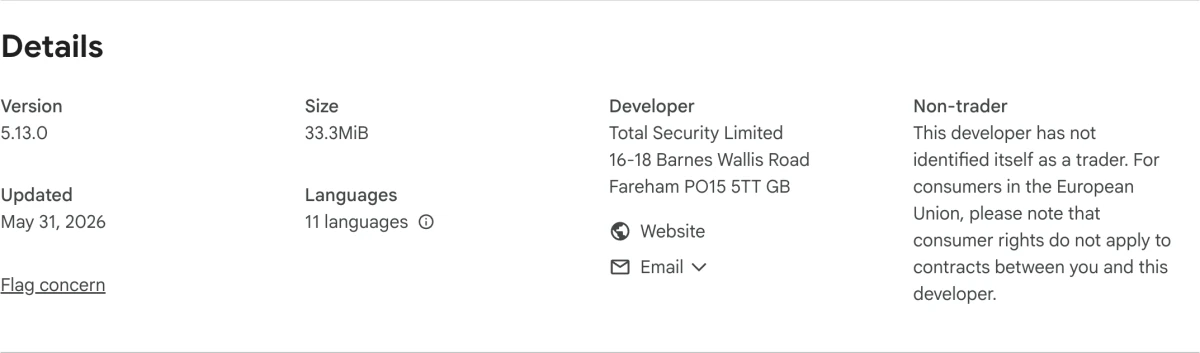
The store showed 800,000 users, a 3.3/5 rating from roughly 2.9K responses and a 33.3 MiB download during our capture. Counts can move daily, and store ratings mix support, billing, site breakage and blocking satisfaction. We date them for context and do not expose them as AggregateRating schema.
Total Adblock's all-site permissions are explainable and still deserve scrutiny
The parsed manifest requested alarms, scripting, browsing data, content settings, cookies, notifications, storage, tabs, unlimited storage, web request, declarative network request and web navigation, plus access to all URLs. Content scripts matched all HTTP and HTTPS pages and relevant Total Security dashboard properties, including YouTube-related behavior. Those capabilities map to blocking page elements, requests, trackers, video ads and notifications.
Functional necessity does not make the permission small. An extension that can observe or modify content on every site sits near webmail, banking, work documents and account sessions. Least privilege therefore asks whether the extension's benefits outweigh that continuing browser position and whether a narrower/native control already solves the problem.
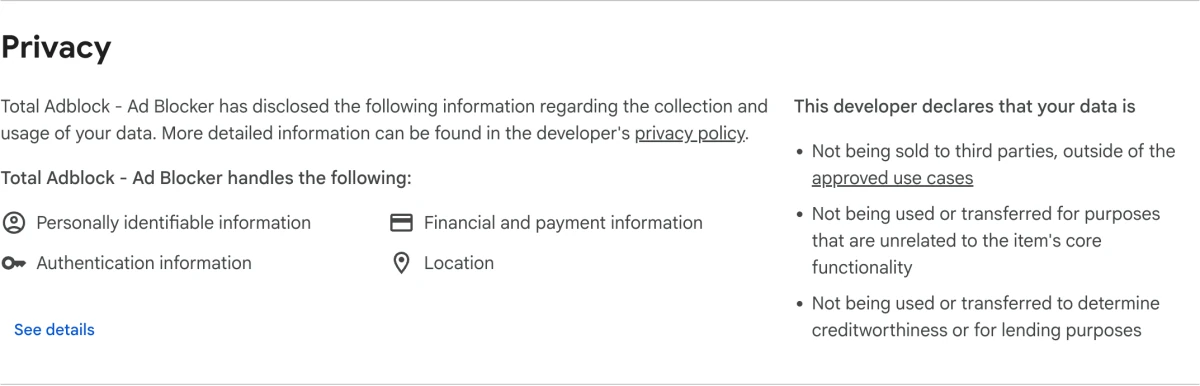
The listing says an IP address is collected at first install to allocate the trial, while personal and payment details are requested only if the user buys premium. Its privacy panel lists personally identifiable, financial/payment, authentication and location categories, along with developer declarations about sale and unrelated transfer. Read those beside the current Total Adblock privacy policy and subscription terms. We neither turn broad access into a spyware accusation nor turn a store disclosure into proof that no risk exists.
Total Adblock earns its place only when the free baseline is not enough
Test the job before buying the brand. Chrome and other browsers already block abusive pop-ups and let users deny site notifications, while tracker-protection levels vary by browser. Free extension alternatives also exist, but they need the same publisher, permission, maintenance and business-model review. Running several blockers at once can duplicate rules, break sites and make troubleshooting harder.
A fair trial uses a repeatable site set: news pages, video services, shopping, a banking login and any work application that depends on scripts. Record visible ads, broken controls, page load, CPU/memory and how quickly the allow list repairs a false block. Do not measure only the number on an extension badge; a high block count can include harmless or duplicated requests.
Keep Total Adblock if it reduces disruptive ads and trackers without breaking important sites, the allow-list workflow is clear and the exact premium renewal is worth paying. Keep the basic version only if the post-trial scope meets the need. Remove it if browser-native settings are enough, if broad access feels disproportionate or if a separate renewal survived after the benefit disappeared.
Scanguard Password Vault is a purchase-specific credential service
Scanguard's current Password Vault setup guidance begins from the point where the user has purchased Password Vault. That wording makes the service plan- or purchase-specific, not a safe universal entitlement. The Windows and macOS paths create and confirm a master password, and the help material describes importing Chrome passwords plus an optional browser assistant for searching, generating, saving and filling credentials.
A password manager's useful test is larger than autofill. Confirm support for every required platform and browser, encrypted sync behavior, account recovery model, secure export, import accuracy, passkeys, sharing, breach alerts, independent security documentation and update cadence. Do not move the only usable copy of important credentials until representative records work on a second device and an offline recovery route has been tested.
The master password should be unique, memorable and never reused for the Scanguard account email. Store recovery material separately from the protected device, and keep MFA/recovery codes for the primary email outside the vault so a lockout does not become circular. Convenience is real only when the vault can survive a lost computer, damaged profile and forgotten account password without unsafe improvisation.
A forgotten Password Vault master password cannot be recovered
Scanguard's current support guidance is unusually clear: nobody, including Scanguard, can recover a forgotten master password. Its “reset” is not a recovery or decryption operation. It removes the existing local vault data and lets the user create a new empty vault, so every password that exists only in the old vault is lost.
Check whether another device or browser session is still unlocked, whether a verified export or backup exists, and whether critical accounts can be recovered independently. Preserve any usable access and recovery material. Follow the current official Scanguard reset guide only after accepting the data loss; never delete vault folders from a copied forum command.
We intentionally do not reproduce the destructive Windows and macOS folder-deletion steps here. Paths and product behavior can change, and a user who reaches this section is precisely the person most likely to delete the last recoverable copy under stress. Open the current Scanguard Password Vault support centre, confirm the operating system and read the warning in full.
A service with unrecoverable encryption can be a legitimate security design, but it transfers recovery responsibility to the customer. The product must make export, backup and emergency access clear enough before the failure. If those answers are not visible, a dedicated password manager with a documented recovery model is a safer home for irreplaceable credentials.
The Password Vault Assistant still ships, but its visible update is old
Google's update endpoint still delivered Scanguard Password Vault Assistant ID dbmjhebcnagfljllolnmbpkghfmckjgl on August 5, 2026. The 101,681-byte CRX3 package reported version 1.4.66 and Manifest V3, with native messaging, tabs and storage permissions. Its content scripts matched file, HTTP and HTTPS pages, while the visible Chrome listing still showed a December 14, 2022 update.
Native messaging is how a browser helper can communicate with the desktop vault, and all-page matching lets it detect and fill login forms. Those functions explain the scope; they do not make the extension malicious. The concern is maintenance confidence: the store snapshot showed only 315 users and four ratings, so a 4.5/5 average says almost nothing about reliability or security.
Before enabling the assistant, verify the exact ID from Scanguard's official route, inspect the current permission prompt and test save/fill on non-critical accounts first. Compare the extension's update history, passkey handling, export/recovery and public security record with dedicated managers. An old visible update is a reason to investigate, not proof that a working package is abandoned or unsafe.
Identity Protection must be judged by the current contract, not an old feature list
Scanguard's current billing and support routes treat Identity Protection as an additional service. A 2025 TechRadar review described dark-web and social monitoring, restoration help, lost-wallet assistance and insurance. During our August 2026 check, Scanguard's public pages did not expose a detailed current benefit and insurance contract that substantiated every one of those promises for every buyer.
That evidence gap matters because identity products vary sharply by country and tier. Before paying, confirm who is eligible, whether the plan covers one person or family, which data sources or credit bureaus are monitored, whether an expert performs restoration or only provides instructions, and how a claim is opened. For insurance, identify the underwriter, limit, deductible, exclusions, reimbursement categories, pre-existing-event rules and territory.
Do not buy an identity service only because “dark web” sounds broader than email monitoring. Alert-only monitoring can duplicate Scanguard's breach scanner and HIBP. Restoration assistance can add genuine value after an event, while insurance may reimburse only defined expenses rather than stolen funds. The signed/current contract, not a marketing badge or historical review, decides which service you are actually buying.
Unlimited Devices is useful only after fixing ordinary entitlement problems
Scanguard uses Unlimited Devices as an add-on example in its billing material. Current terms for expanded household use still sit inside personal, non-commercial and fair-use boundaries rather than promising unrestricted deployment to a business, school or unrelated group. The exact plan and territory control how many devices and people are allowed.
Before buying more coverage, open the current device list and remove retired, sold or duplicated machines where the portal allows it. Confirm that the app is signed into the purchasing email and that mobile installations consume the same entitlement under the exact plan. Our account, activation and device guide handles stale counters, license transfer and wrong-account symptoms.
Then compare the add-on renewal with a different core plan or security product that already covers the household. Extra-device capacity is valuable when real active devices exceed a verified allowance. It is waste when purchased to hide a sync delay, forgotten login or device that should have been removed.
Audit every Scanguard service as a separate recurring commitment
Use the dashboard as an index, then verify it against receipts and payment statements. For each service, capture the exact name, purchase date, term, introductory charge, regular renewal, next billing date, merchant and auto-renewal state. A screenshot after purchase is stronger than memory of a checkout badge, especially when several related products use the same account email.
Do not infer cancellation from disappearance of an icon or uninstallation of an extension. Removing Total Adblock stops the local browser component but does not necessarily terminate its billing agreement. Canceling Scanguard Premium does not necessarily cancel a separate device, identity, VPN or ad-block service. Conversely, canceling a service should not be treated as removing software or handing malware protection safely to another product.
The dedicated Scanguard pricing and renewal guide owns current term arithmetic and regional checkout evidence. Use it to calculate the whole stack rather than the first-year antivirus price alone. An add-on that seems cheap in isolation can push the renewal total above a competitor bundle that includes the same job.
Scanguard add-ons currently use a 14-day refund window
Scanguard's current refund guide gives annual and biannual main subscriptions 30 days from initial purchase or renewal. Monthly, quarterly and add-on services use 14 days, even when an add-on itself is billed annually. The relevant date is the activation or renewal of that service, not the date the customer notices it.
Turning off auto-renewal is not a refund request. It normally prevents the next charge while leaving current access active to the term end. A refund requires termination, ends service when processed and must be requested through the correct merchant. Apple App Store and Google Play purchases use their store routes rather than Scanguard's direct-card workflow.
Our Scanguard cancellation and refund guide covers the full procedure and evidence checklist. For this add-on decision, the rule is simpler: record the 14-day deadline immediately, test the service before it expires and cancel each unwanted service row separately. Save both the portal status and confirmation email.
Avoid paying twice for the same alert, blocker or device
Start from outcomes rather than product names. Email breach alerts may overlap with HIBP, a password manager or a bank/identity service. Total Adblock may overlap with a browser's notification and tracking controls or another blocker. Unlimited Devices may duplicate capacity in a different security plan, while Identity Protection may overlap with an employer, bank, insurer or credit bureau.
| Need | Scanguard-family option | Free or existing baseline | Evidence that justifies keeping the paid extra |
|---|---|---|---|
| Breach notice | Email Breach Scanner | HIBP; provider security alerts | Earlier or clearer event/data detail that changes action |
| Ad/tracker control | Total Adblock | Browser controls; maintained free blocker | Better blocking with stable important sites and fair renewal |
| Credential management | Password Vault | Existing manager/browser vault | Safe import/export, recovery, maintenance and required platforms |
| Identity response | Identity Protection | Government recovery; bank/credit alerts | Qualified restoration or contract benefits you can actually claim |
| More devices | Unlimited Devices | Remove stale devices; current plan allowance | Verified active household need under current terms |
Overlap is not automatically bad. Two independent breach sources can improve visibility, and a paid identity specialist can help when free alerts stop at notification. The mistake is paying for a duplicate without naming the extra signal, action or coverage it adds.
Who should buy each extra—and who should skip it
Keep breach alerts when they are included in the exact plan and provide event-specific detail. They cost little operationally and can expose dangerous password reuse. Skip paying for a duplicate feed when it only repeats handled, historical events without a new action.
Consider Total Adblock when disruptive ads, trackers or notifications remain a real problem after browser settings, and the premium trial proves stable on the sites you use. Skip it when native controls are enough, another blocker already owns the job or the separate renewal exceeds the benefit.
Consider Password Vault only after testing migration, export, second-device recovery and the master-password failure model. Users who want documented passkey support, mature emergency access or broad cross-platform maintenance should compare dedicated managers before moving critical records. Never make the Scanguard vault the only copy during migration.
Buy Identity Protection only when the live contract offers restoration or claimable benefits that matter in your country. Buy Unlimited Devices only for verified household capacity beyond the core allowance. Neither service should be used as a vague comfort purchase or a shortcut around an account problem.
Current community evidence is useful for principles, not Scanguard-specific accusations
Our current search did not find a substantial, recent Reddit thread that independently tested this exact set of Scanguard extras under the current contracts and extension versions. Broader security discussions consistently emphasize unique passwords, MFA, direct account recovery, fewer privileged extensions and checking the publisher/ID before installation. Those are sound practices, but they do not prove that Scanguard's breach feed missed a specific incident or that an extension is malicious.
TechRadar remains useful independent Scanguard context, particularly for showing that separately paid identity and ad-block features have existed. Its identity-service detail comes from a 2025 review, so we do not carry the listed insurance or assistance benefits forward as a universal 2026 promise. Current primary contract evidence wins when the two differ or when the older article is more specific than the vendor's live public terms.
This boundary is deliberate. We do not invent a named Reddit quote, convert generic dislike of optimizers into a product defect or treat a small store rating as laboratory evidence. Reproducible package metadata, direct billing terms and clear post-alert actions are more useful to a buyer than borrowed outrage.
Scanguard add-ons FAQ
Which Scanguard add-ons are included with Premium?
The current public Scanguard Premium page lists Email Breach Scanner & Alerts alongside the antivirus features. It does not prove that every historical, regional or customer plan has the same entitlement. Open My Services or My Subscriptions and match the exact service name, renewal and device allowance before relying on any extra.
Is Scanguard data breach monitoring useful?
It can be useful when an alert names the breached service, exposure date and data categories clearly enough to drive action. It does not prevent the breach, remove leaked copies or prove that an old password remains active. Its value comes from changing reused credentials, ending suspicious sessions and enabling MFA promptly.
Is Total Adblock included with Scanguard?
Do not assume so. Scanguard promotes Total Adblock as part of its wider feature family, but Total Adblock is a distinct Total Security Limited service with its own extension, trial, portal and possible subscription. Check the final cart, receipt and every service row in the portal.
Does Total Adblock remain free after its trial?
The current official Chrome listing says the seven-day premium trial falls back to basic ad-block features for free, while premium is needed to maintain broader protection on popular sites. That wording and the checkout can change, so verify the live scope and renewal rather than relying on an old site-count claim.
Why does Total Adblock need access to all websites?
An ad blocker must inspect or modify page requests and content across the sites where it is expected to work. That explains broad host access, scripting and network-related permissions, but the scope is still powerful. Verify the official extension ID, keep the browser updated and remove the extension if native controls meet your needs.
Can Scanguard recover a forgotten Password Vault master password?
Scanguard's current support guidance says nobody, including Scanguard, can recover it. The reset route creates a new vault and deletes the passwords in the old one. Before accepting that loss, check any still-unlocked device, usable backup, export or recovery material and follow only the current official guide.
Is the Scanguard Password Vault Assistant safe?
Our package check verified a store-delivered Manifest V3 extension with native messaging, tab and storage permissions; it was last visibly updated in December 2022. Those facts do not prove insecurity or safety. Its age, tiny review base and all-page content-script scope are reasons to compare maintenance, export, recovery and passkey support before migrating irreplaceable credentials.
What should I do after a breach alert exposes a password?
Open the affected service from a trusted bookmark or typed address, change that password and every reused copy, terminate unfamiliar sessions and enable phishing-resistant MFA where available. Do not follow a login link in the alert until you have independently verified its sender and domain.
Does breach monitoring replace identity protection?
No. An email or dark-web alert reports known exposure. Identity restoration, credit monitoring, lost-wallet help, insurance and reimbursement are separate services with country, eligibility, underwriter, deductible and exclusion rules. Buy only from the current contract, not a feature list copied from an older review.
Do I need Scanguard Unlimited Devices?
Only if the exact core allowance is genuinely too small after stale or retired devices are removed. Current terms frame expanded coverage as personal, non-commercial use for one person or immediate family and retain fair-use controls. Do not buy another entitlement merely to solve an account mismatch.
Do Scanguard add-ons renew separately?
They can. Scanguard's billing centre says add-on services tied to the main account may renew separately unless stated otherwise. One login is an account convenience, not proof of one contract, so record each service, next charge, amount and cancellation state.
What is the refund window for a Scanguard add-on?
Scanguard's current refund guide gives monthly, quarterly and add-on services 14 days from initial purchase or renewal, even when an add-on is billed annually. Annual and biannual main plans use 30 days. A refund requires termination; switching off auto-renewal alone does not reverse a current charge.
Bottom line: buy the action and contract, not the account badge
Scanguard's current public Premium page makes Email Breach Scanner & Alerts the easiest extra to defend. Keep it when the portal confirms entitlement and the alert provides enough detail to change a password, end sessions, turn on MFA or start identity recovery. Remember that monitoring reports known exposure; it does not prevent a breach or erase leaked data.
Total Adblock is a real, current Manifest V3 extension with a maintained May 2026 package. It is also a distinct service boundary with broad all-site access and a possible premium renewal, so browser-native controls and the post-trial basic tier deserve a fair comparison. Password Vault can be useful, but its master password cannot be recovered and the official reset destroys the vault. Migration and recovery planning come before autofill convenience.
Identity Protection and Unlimited Devices can solve real problems only when the current contract matches the household and country. Inventory every service, renewal and refund deadline separately, eliminate overlap and keep the products that produce a measurable action. The strongest Scanguard setup is often smaller than the portal's complete menu.