
Scanguard Mobile Review: Android APK, iPhone Limits and Fire HD Reality
“Scanguard Mobile” is not one identical app on three screens. Android currently uses a sideloaded vendor APK, iPhone offers a sandboxed web, breach and cleanup utility, and Fire HD support is claimed without a public current Fire build we could verify.

Quick verdict: Scanguard Mobile is easiest to justify on an iPhone only as a narrow web, breach-alert and photo-cleanup utility, not as a full antivirus scanner. Android has the broader antivirus feature set, but the official public path currently delivers a 2023 APK outside Google Play; that makes source, signature, Play Protect and permission checks part of the product decision. Fire HD is the weakest claim: Scanguard names the platform, yet we found no current public Amazon listing or Fire-specific guide, so the generic Android APK should not be treated as a verified Fire build. None of the three variants has current Scanguard-specific mobile lab coverage in the major 2026 tables we checked.
Scanguard Mobile needs three platform verdicts, not one score
The word “mobile” hides the most important part of this review. On Android, Scanguard wants access to installed packages, storage and background events so it can behave like a mobile antivirus and utility suite. On iPhone, Apple's sandbox blocks that whole-device model, so the app concentrates on dangerous websites, breach alerts and selected photos. Fire HD sits between them technically, but the current public distribution evidence does not prove that Scanguard's Android binary is the supported Fire product.
That means a single star rating would be false precision. The Android question is whether an older sideloaded build and its permissions are acceptable. The iPhone question is whether a limited utility is worth its subscription. The Fire question is whether a compatible build exists for the exact device at all.
| Platform | Current public route | What it can realistically do | Evidence problem | Verdict |
|---|---|---|---|---|
| Android | Vendor-hosted APK outside Google Play | App/package scanning, install monitoring, cleanup, App Lock and account extras | 2023 build; no current Scanguard mobile lab row | Use only after strict verification |
| iPhone | US Apple App Store listing | Web/phishing filtering, breach alerts and authorized photo cleanup | Not a whole-device antivirus; version last updated in 2023 | Narrow utility, not AV replacement |
| Fire HD | Support claim, but no public current listing found | Unknown until a Fire-specific build is offered | Generic APK compatibility not proven | Do not sideload by assumption |
For Scanguard as a company, contract and desktop product, use our full Scanguard review. This page deliberately owns only the platform-specific mobile decision.
Scanguard's current support claims conflict with its public distribution
Scanguard's current features-and-benefits page names Windows, macOS, iOS, Android and Fire HD. Its public software page, however, says the security applications are available for Android, Windows and Mac. That second page omits both iOS and Fire HD even though a live iPhone listing exists.
The Android button on the software page still points to a Google Play URL using com.scanguard.android. That public URL returned HTTP 404 in our August 5 US check. An Android user agent sent to Scanguard's own download endpoint was instead redirected to a different package, com.scanguard.mobilesecurity.android, hosted in the vendor's Google Cloud Storage path.
This is documentation debt, not automatic proof of a scam or an unsafe package. It is still consequential. A security vendor should make the current store, package and platform boundaries easy to verify; when those signals disagree, the reader has to do work the product page should have done.
The Android app is genuine vendor software, but the delivery path is the issue
Scanguard does currently deliver an Android package. When we visited its device-aware download endpoint with an Android 16 user agent, it redirected to scanguard-1.6.8.apk under storage.googleapis.com/ss-installers/android/scanguard/. We downloaded that exact file for static inspection only; we did not execute it, create an account or grant it device access.
The result was a valid APK named ScanGuard, signed with a certificate identifying Protected.net. That supports provenance for the checked file. It does not prove that the package is free of malicious code, independently tested, updated for the current Android security model or suitable for a banking phone.
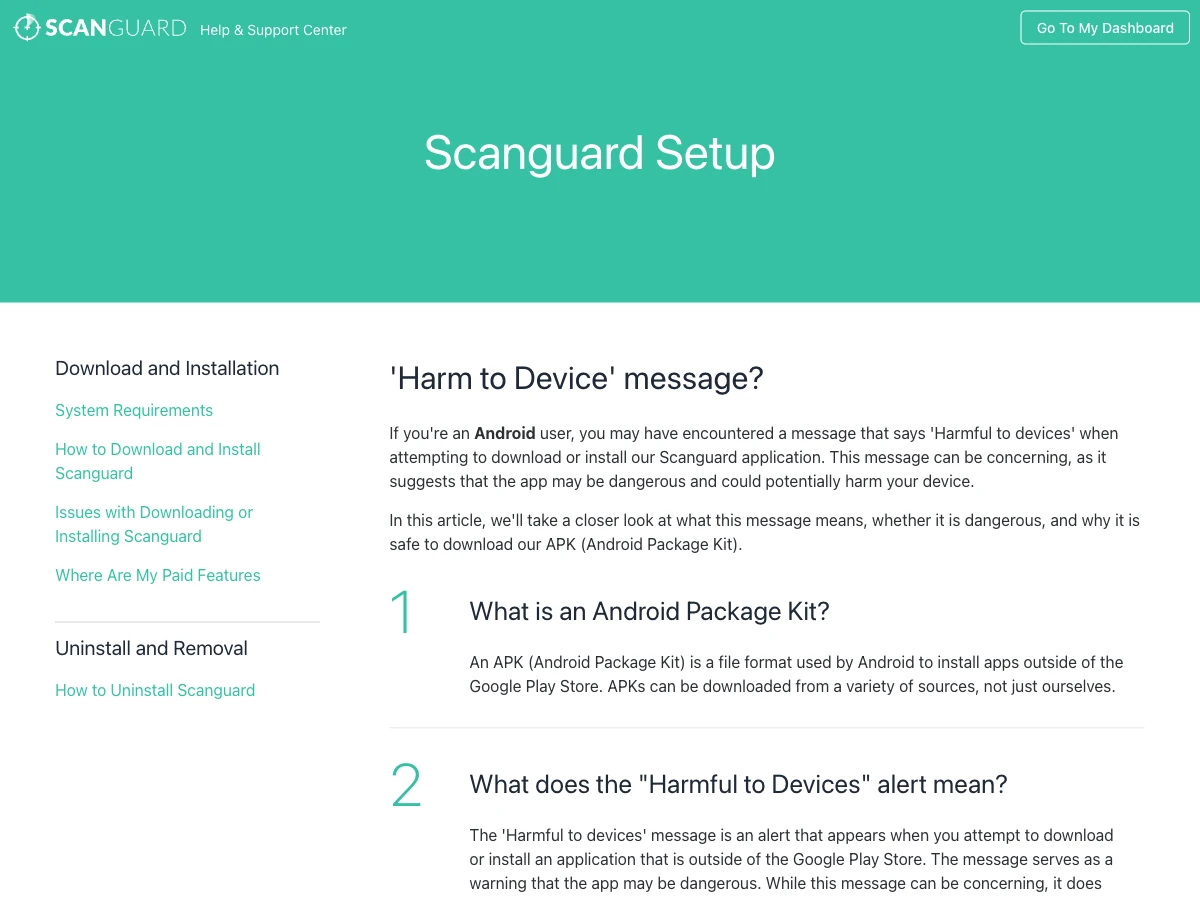
Scanguard's own “Harmful to device” article acknowledges that the app is distributed outside Google Play and says it includes functions beyond what Google Play permits. That is the vendor's explanation. It cannot overrule a current Play Protect classification on the reader's device.
The current Scanguard APK has a verifiable package, hash and signing identity
A useful APK review starts with reproducible facts, not “the icon looked right.” The table below records the exact file Scanguard's Android route delivered on August 5, 2026. These values are dated evidence; compare them with the current vendor route rather than assuming they will never change.
| Field | Checked value | Why it matters |
|---|---|---|
| Display name | ScanGuard | Human-facing name only; not unique identity |
| Package ID | com.scanguard.mobilesecurity.android | Different from the stale Play link |
| Version | 1.6.8, code 174 | Matches the vendor-delivered binary and old archive history |
| File size | 43,060,105 bytes | Helps detect an unexpected replacement |
| SHA-256 | dd3639b8688895f8872c6965762106c79bd32558e71e514248bd4f1875b8e2b8 | Exact fingerprint of the checked file |
| Storage last modified | June 9, 2023 | Shows update age of the delivered object |
| SDK | Minimum 21; target 33 | Android 5 minimum, Android 13 target |
| Certificate | Protected.net Goup Limited | The certificate itself contains that spelling |
| Certificate SHA-256 | E9:F3:78:19:A1:E3:C8:64:16:BA:F8:94:05:97:D4:87:5C:19:D2:6D:02:18:34:4C:A0:55:C2:14:BD:DB:D1:B6 | Signing identity for this package |
The static audit verifies packaging facts and declared capabilities. It is not a dynamic behavioral analysis or a current multi-engine malware result. A changed hash may be a legitimate update, but a changed package, certificate or source requires a fresh explanation before installation.
Do not download Scanguard from APK mirrors merely because they display the same version. The current official route and current device verdict are the control points. A mirror adds another supply-chain owner and may serve a repackaged file later.
A safe Android decision preserves Play Protect and stops on identity changes
Start from Scanguard's current help or dashboard while already signed into the intended account. Confirm the browser remains on a Scanguard-controlled route before it redirects, then compare the resulting package identity with the current vendor evidence. Do not search the app name in a third-party store and choose the closest icon; Google Play currently contains similarly named products from unrelated developers.
Keep Play Protect enabled. Google's current Play Protect guidance says it checks store and outside-store apps, may ask to scan an unknown build, warns about potentially harmful apps and can block or remove them. Scanguard does not get a blanket exception because it sells security software. Do not disable Play Protect to make this or any other sideload install.
If the file is merely unknown, let Play Protect perform its scan and review the result. If Android says the app is harmful, blocks it, reports a different package identity or shows a source you did not choose, stop. The next step is a current vendor explanation or an independently tested store-distributed alternative—not disabling the protection that raised the issue.
“Harmful to device” is not one universal Android warning
Three messages are often collapsed into one phrase. A browser can say an APK file may harm the device because APKs install software. Play Protect can say it has not seen the app and offer a code scan. Or Play Protect can positively identify a potentially harmful app, sensitive-permission risk or identity problem and block the install. Those states do not justify the same action.

Google's warning guidance for developers also distinguishes an app-scan recommendation from a harmful-app block. It tells developers to review APIs, permissions, code and policies and to appeal false classifications through the formal process. That responsibility belongs to the developer; users should not be asked to neutralize device security while an appeal is unresolved.
Scanguard's help text is therefore only partly sufficient. It correctly explains what an APK is and that an outside-store warning does not automatically prove harm. It does not give the reader permission to ignore every later Play Protect message.
The Android manifest asks for broad access that needs feature-by-feature justification
The checked APK declares ordinary network, wake, vibration, boot and foreground-service permissions alongside broader capabilities. Declared does not mean granted: Android still mediates dangerous and special access. It also does not mean malicious. The right question is whether the installed feature explains each request and whether the reader needs that feature. Google's Android permissions model explains how protection levels and runtime approval differ, which is why a manifest line alone cannot prove either access or abuse.
| Declared capability | Plausible product use | User decision | Stop condition |
|---|---|---|---|
QUERY_ALL_PACKAGES | Inventory installed apps for security scanning | Reasonable only for the antivirus function | No clear app-scan feature or unexpected package |
| Package usage statistics | App activity, optimizer or App Lock context | Grant only when a named feature requires it | Broad access requested before feature explanation |
| Manage/read/write external storage | Scan files and clean selected storage | Review scope before approval | Unrelated data requested or deletion is unclear |
| Accessibility service binding | Web protection or App Lock interaction | Verify exact service name and purpose | Random similarly named service or unexplained control |
| Read phone state | Device/account or network context | Deny unless the current flow explains it | Feature works without it or explanation is vague |
| Request package deletion | Cleanup or remediation recommendation | Keep final uninstall choice visible | Silent or pressured removal behavior |
| Kill background processes | Legacy optimizer behavior | Question value on current Android | Promises impossible permanent speed gains |
The package also declares an antivirus service, package monitor, network monitor, incognito search and Google Analytics components. Google Play Billing 4.0.0 appears in metadata. That composition matches a security-and-utility suite, but it increases the trust surface compared with a simple on-demand scanner.
Grant one special access at a time, confirm the promised feature begins working and revisit Android's Special app access, Accessibility, battery and data panels after a day. If Scanguard cannot explain a permission in current documentation, deny it and judge the app by what remains useful.
Android gets the broadest Scanguard feature set, with several legacy utility ideas
Scanguard's public Android page describes an antivirus engine, storage recovery, smartphone optimization, App Lock, Password Vault and Safe Browsing VPN. The inspected package contains services consistent with app scanning and install monitoring. That is materially broader than the iPhone build.
The valuable core is app/package protection: inspect installed apps, watch new installs and surface a clear detection before the user opens something risky. Storage cleanup can help when it previews exact candidates and preserves a final decision. App Lock can be useful on a shared phone, although modern Android versions and manufacturer secure folders may already offer a stronger system-level option.
Be skeptical of one-tap speed promises. Current Android manages background processes, cached apps and battery policy aggressively; killing processes can cause them to restart and may increase work rather than create lasting speed. Review cleanup suggestions before deletion and compare the VPN separately in our Scanguard Safe Browsing VPN review.
Feature presence can also depend on subscription and account state. The marketing list does not prove that every button is included in the reader's plan, region or build. Check My Services before granting access for a paid component that never activates.
The Android build targets Android 13 while current evidence is already on Android 16
Version 1.6.8 was last modified in the vendor storage object in June 2023 and targets SDK 33, Android 13. A target SDK is not the same as a maximum version; Android usually runs older-targeted apps under compatibility behavior. The concern is maintenance distance: privacy controls, background limits, developer verification and Play Protect behavior have continued to change.
Google's current Android Advanced Protection guidance can block unknown-source installations and restrict unverified accessibility services. Android developer verification is also rolling out by region and store. A package that installed on a 2023 phone may face different prompts or restrictions now.
Do not solve those conflicts by turning safeguards off. Ask whether Scanguard has a current build, whether the dashboard offers a newer package and whether its signing identity matches. If the answer remains a 2023 sideload while a banking phone runs Android 16, the update gap is a legitimate reason to choose a current Play-distributed alternative.
Current Android lab tables do not include Scanguard
AV-TEST's May 2026 Android table lists twelve products and evaluates protection, performance and usability. Protected.net TotalAV Mobile Security appears; Scanguard does not. That absence is not a zero score or a failed certification. It means this page cannot publish a current AV-TEST Scanguard Android percentage.
AV-Comparatives' May 2026 Mobile Security Review tests nine products taken from Google Play on Android 16, using 3,156 malicious APKs and 500 clean apps. Scanguard is absent there too. An outside-Play app would require its own clearly named test; a sibling product's row cannot be inherited.
| Evidence | Platform/build | Scanguard included? | What we can conclude |
|---|---|---|---|
| AV-TEST May 2026 | Current Android products | No | No direct current AV-TEST mobile score |
| AV-Comparatives May 2026 | Google Play apps on Android 16 | No | No direct current protection/battery result |
| SE Labs Jan–Mar 2026 | Scanguard Windows home product | Yes, Windows only | Cannot transfer to Android or iPhone |
| Apple App Store review | Store policy and app review | iPhone listing exists | Not an antivirus detection benchmark |
Independent reviewers such as SafetyDetectives have published Android hands-on impressions, but their testing predates the current platform state and does not replace a 2026 comparative lab. Use those reviews for interface and feature context, not a durable detection rate.
The iPhone app is a web, breach and cleanup utility—not a full antivirus
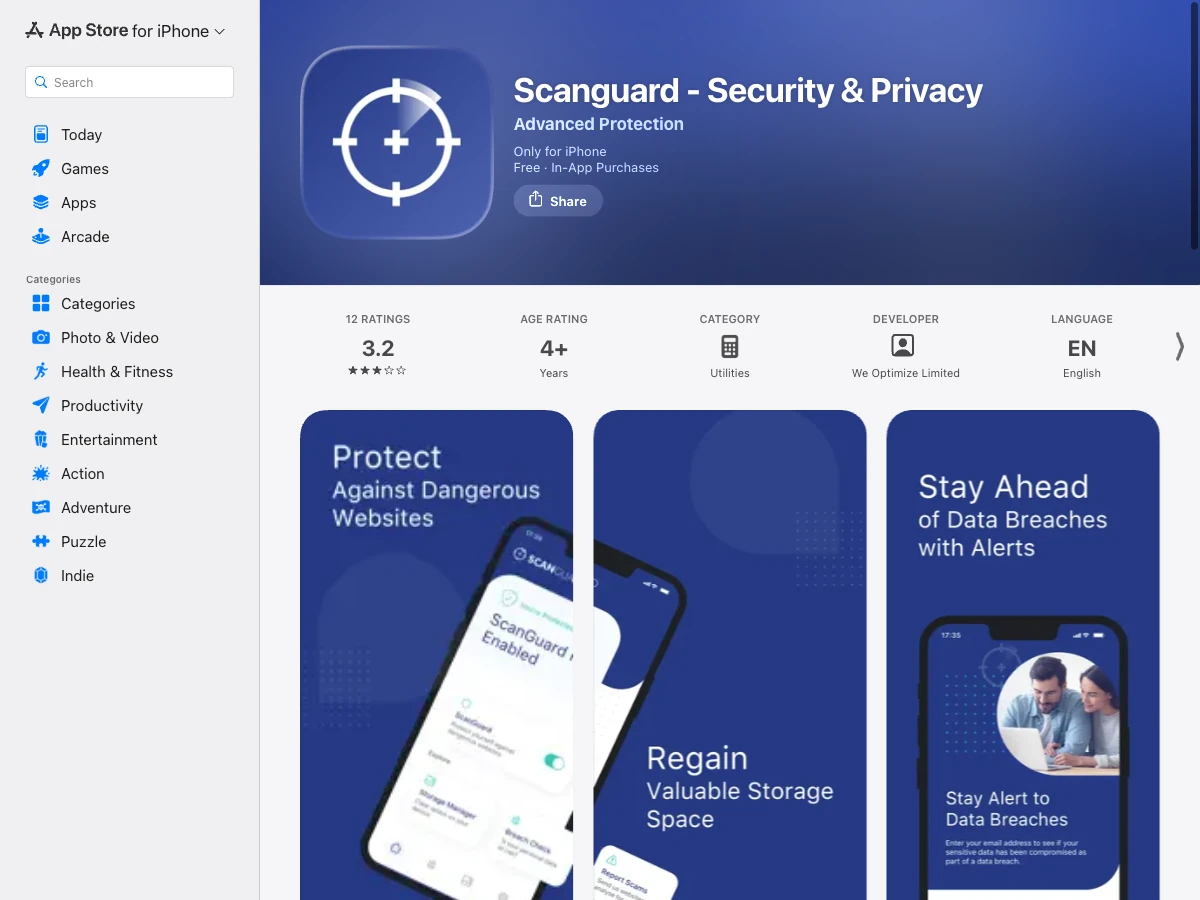
A genuine current Apple listing exists for Scanguard - Security & Privacy by We Optimize Limited. Its listing emphasizes blocking dangerous or phishing websites, alerting on exposed email addresses and reclaiming storage by reviewing old, duplicate or burst photos, videos and screenshots.
Those are useful mobile-security-adjacent jobs. Phishing and account takeover cause more real-world harm to many iPhone owners than a classic self-replicating file virus. Breach alerts can prompt password changes, and a carefully designed photo review can recover storage without pretending to clean the operating system.
What the app cannot honestly be is a Windows-style scanner with access to every installed app, process and system file. Apple does not give an ordinary App Store utility that reach. If the buying pitch in the reader's head is “scan my whole iPhone for malware,” Scanguard cannot satisfy it.
The US App Store build is version 1.0.2 and has not updated since 2023
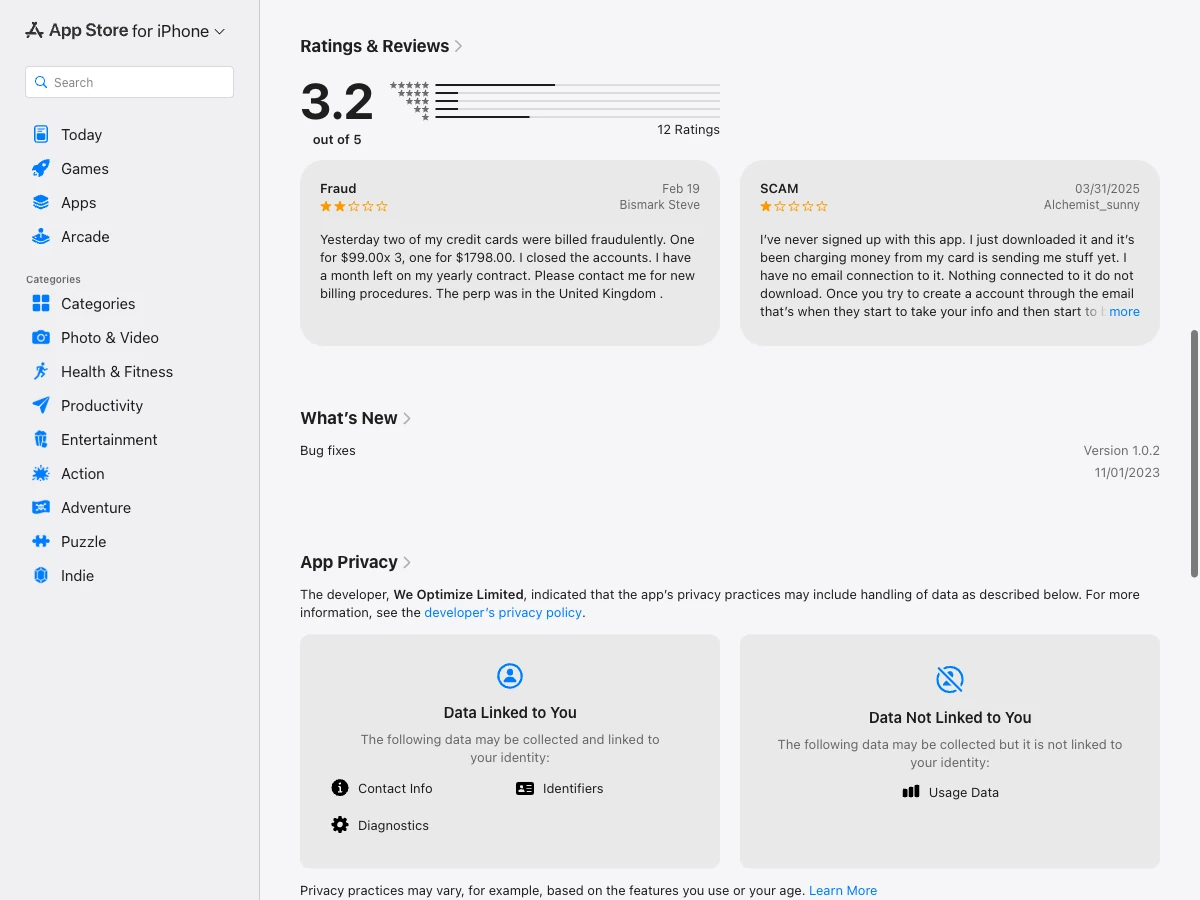
On August 5, 2026, the US listing showed version 1.0.2, updated November 1, 2023, with a 12.2 MB size and iOS 15.0-or-later requirement. The page displayed 3.2/5 from twelve ratings. That sample is too small to establish security quality, and the number changed even between a search cache and the live page during our review.
The Information panel displayed a Scanguard Monthly Subscription at $7.99. That is a dated US storefront observation, not a global quote or a promise that no trial, tax or other term applies. Apple-billed subscriptions are managed through Apple; direct Scanguard services may sit in a separate billing relationship.
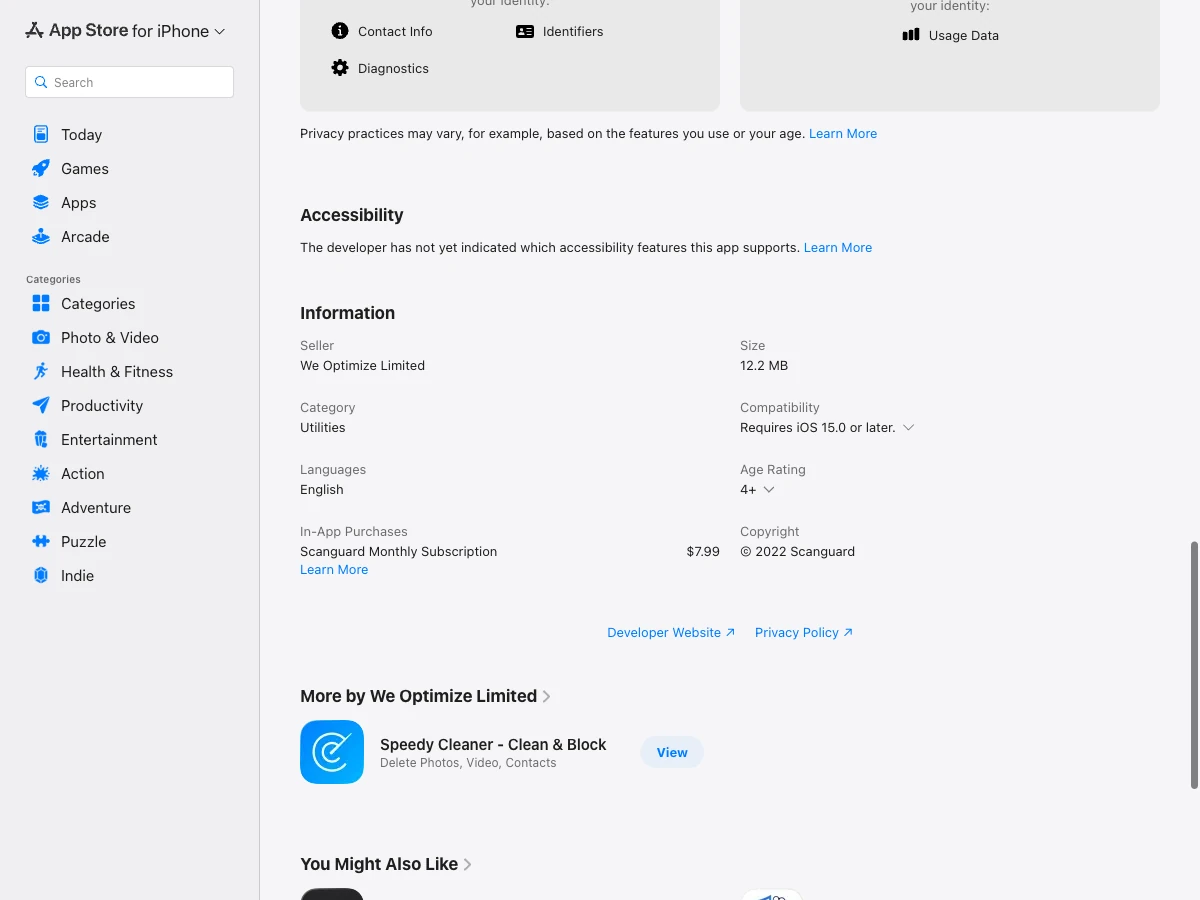
The listing headline says “Only for iPhone,” while its description mentions iPad and the compatibility disclosure has its own device list. Do not buy on the assumption that every iPad or family device is eligible. Open the exact listing on the target device and confirm the Install button and account entitlement there.
Apple's sandbox explains why Scanguard cannot scan an iPhone like a PC
Apple's iOS app-security model verifies approved sources and code signatures, then isolates apps so they cannot compromise other apps or the system. Apple's file-system rules generally limit each app to its own container, with selected data exposed only through specific user-authorized APIs.
That architecture restricts both malware and antivirus software. Scanguard cannot walk through another app's private database, inspect arbitrary executable memory or quarantine system components. It can inspect content the user selects, use approved network filtering, check an email against a breach service and manage its own data.
This is not a defect unique to Scanguard; it is the platform boundary. The editorial problem begins when any vendor uses the word “antivirus” without explaining what its iPhone app actually protects. Judge Scanguard on phishing, breach and cleanup outcomes rather than a scan it cannot perform.
The iPhone listing declares identity-linked data and deserves a permission audit
The App Privacy panel says the developer may collect contact information, identifiers and diagnostics linked to the user. It names email address, name, device ID and crash data across marketing, analytics, personalization and app functionality. Product-interaction usage data may be collected without being linked to identity.
Apple explicitly labels these as developer-provided declarations. They are not an independent privacy audit. That does not make the practices improper, but a security app handling breach checks and web protection should earn its data access with a clear feature explanation.
Grant photo access only when using cleanup, and prefer selected-photo access where the current iOS flow permits it. Review any VPN or network-filter configuration before approval because it can affect traffic routing. If the app asks for contacts, tracking or another unrelated category, pause and match the request to the current privacy policy and chosen feature.
Breach monitoring also needs an email address to perform its stated job. Use an address you control, understand retention and deletion choices and do not confuse “no breach found” with proof that an account is secure. The dedicated Scanguard breach and add-ons guide explains what to do after a real exposure.
Fire HD support is claimed, but the current generic APK is not a proven Fire build
Scanguard's account help names Fire HD. We could not locate a current public Amazon Appstore listing, Fire-specific requirements page or Fire install guide during the August 5 check, and Scanguard's public software page omits Fire HD. That leaves the compatibility claim without a public operational path.
Amazon documents Fire OS as an Android fork, but it also explains that app compatibility depends on API levels, manifest requirements, hardware and service dependencies. An Android app often needs adjustments when it relies on Google Play services or billing. The checked Scanguard APK includes Google Analytics services and Google Play Billing metadata.
Those components do not prove the APK will fail on Fire HD, but they defeat the shortcut “Fire OS is Android, so just sideload it.” A security app also needs background execution, package visibility, storage access and update delivery to work reliably. Partial launch is not the same as supported protection.
Mobile activation problems often belong to the account or merchant, not the app
A Scanguard login can contain direct subscriptions, store purchases, add-ons and several device rows. The app may install correctly while a paid feature remains unavailable because the email, merchant, service or device entitlement does not match. Reinstalling does not repair that contract state.
On Android, compare the account shown in the app with the portal receipt and current My Services row. On iPhone, determine whether Apple or Scanguard billed the subscription. On Fire HD, the absence of a device-specific download is a compatibility problem before it becomes an activation problem.
Use our Scanguard account, activation and devices guide to reconcile email, licence sharing and stale devices. If the symptom is an unfamiliar amount rather than a missing button, use the Scanguard charge and overcharge guide. Buying a second subscription hides the original error and can create another renewal.
Android WebShield and real-time monitoring can fail when special access is revoked
Android battery optimization and manufacturer background policies can stop a security service even after installation. Web protection may also rely on Accessibility or a network/VPN-style component. The exact route varies across Samsung, Pixel, Xiaomi and other Android builds, so a copied menu path can be wrong even when the principle is right.
First confirm the installed package identity and current protection status. Then inspect Scanguard's battery setting, background data, notification, Accessibility and special-app-access entries. Restore only the permission that the named feature documents; do not whitelist every component or disable system-wide battery protections.
Scanguard's current WebShield documentation sometimes shows sibling-brand TotalAV labels. Our Scanguard WebShield and blocked-site guide explains that shared-brand documentation mismatch and the safe recovery path. A TotalAV-labelled service should never be approved blindly merely because it appears on a Scanguard-hosted page.
iPhone background behavior is different. iOS manages app execution and network extensions under its own rules, so an Android battery-exemption fix does not apply. Confirm the iOS protection/filter status inside Settings and the app rather than looking for an Android-style resident scanner.
Measure battery, data and background activity instead of trusting “lightweight”
We found no current independent Scanguard Mobile battery test that supports a universal drain percentage. The 2026 AV-Comparatives report measures other Android products, not Scanguard. Old reviewer impressions on a different phone and Android release cannot be reused as our benchmark.
Record a normal 24-hour baseline with the same travel, screen and network pattern. After installing the verified build, record Android battery use, background time, mobile data, scan duration and any persistent notification for another 24 hours. Repeat once after initial updates and the first scan finish, because first-day work is not steady state.
On iPhone, compare battery and data use while the web protection is enabled and inspect any VPN/network extension separately. Photo cleanup should be measured during an intentional review, not left to infer continuous scanning. On Fire HD, do not run a generic APK performance experiment until compatibility is proven.
A security app can justify some background cost if it catches the risk you actually face. Persistent top-of-chart battery use, repeated process restarts or unexplained mobile data requires a support explanation. Preserve screenshots and app version before changing settings so the problem remains diagnosable.
Remove the mobile app, its special access and its billing relationship separately
On Android, uninstall Scanguard through Settings → Apps after reviewing any quarantined or vaulted items you still need. Then check Accessibility, VPN, Device admin, Special app access, installed certificates and battery exemptions for a remaining Scanguard entry. Android normally removes app permissions with the package, but a manual verification is appropriate after a sideloaded security suite.
On iPhone, delete the app and inspect Settings for a remaining VPN or network filter. Photo access ends with removal, but a subscription continues until it is cancelled through its merchant. Apple purchases belong in Settings → Apple Account → Subscriptions; direct web purchases follow Scanguard's portal terms.
Do not factory-reset a normal phone merely because you changed antivirus products. A reset belongs to a confirmed or serious compromise investigation, not routine uninstallation. For Windows and Mac remnants, use our separate complete Scanguard removal guide; its desktop service and browser-cleanup steps do not belong on a phone. Also do not assume the app's disappearance cancelled payment; our Scanguard cancellation and refund guide separates software removal, service termination and refund eligibility.
Current store distribution and mobile lab evidence are valid reasons to choose an alternative
For Android, the May 2026 AV-TEST table gives directly tested choices including Bitdefender, Norton, Avast, AVG, Avira, F-Secure, Kaspersky, McAfee and Sophos. AV-Comparatives' current report also reviews products distributed through Google Play and tests malware, false positives and battery. A live store update path plus current platform testing is a meaningful advantage over a 2023 sideload.
For iPhone, choose by the job. Apple's built-in app security, passcode, updates, Stolen Device Protection and account controls form the baseline. A third-party app can add phishing filtering, breach monitoring, VPN or identity services, but no ordinary iOS utility becomes a desktop antivirus. Compare privacy and subscription terms for the exact function.
For Fire HD, start with the Amazon Appstore and exact model compatibility. A vendor that publishes a current Fire build, update history and Fire-specific support path is easier to trust than an Android marketing claim. If the tablet cannot receive current Fire OS security updates, replacing the device may improve security more than adding another app.
Our broader best antivirus for Android guide owns ranked choices. The forthcoming Scanguard alternatives page will compare contracts and full suites rather than forcing every product decision into this mobile review.
Who should use Scanguard Mobile—and who should skip it
Consider Android Scanguard only if you already have a valid entitlement, the current official route delivers a package whose source and signature you can verify, Play Protect accepts it and you need its app-scanning or install-monitoring functions. Grant permissions progressively and measure the result during the refund window.
Consider the iPhone app if you specifically want its phishing, breach-alert or photo-review functions and the current App Store price is competitive. Keep expectations narrow: it complements Apple's security model and cannot scan the entire phone.
Skip Android Scanguard if a current Play Store update path and direct 2026 lab evidence are non-negotiable, if Play Protect flags the package as harmful, or if broad permissions are requested without a current explanation. A banking phone is a poor place to experiment with an unresolved security warning.
Skip Fire HD Scanguard unless a current Fire-specific build appears for the exact tablet. Also skip a duplicate subscription when the real problem is account activation, and skip any support interaction that asks for remote control, gift cards, cryptocurrency or device-security bypasses.
Current community discussion supplies caution, not a Scanguard mobile verdict
We did not find a strong current Reddit body of Scanguard-specific Android, iPhone or Fire HD testing. Current r/antivirus threads disagree about whether Android needs a third-party antivirus at all, but they repeatedly return to updates, official stores, Play Protect, permission review and avoiding random APKs. Those principles are useful; the votes are not a detection benchmark.
A recent discussion about a dubious Android app installed outside the store focused on source, permissions and the limits of post-infection scanning. Another thread about on-demand Android antivirus shows the continuing disagreement about sandboxing and value. Neither tested this Scanguard package.
The twelve live App Store ratings are also too small and billing-heavy to establish security quality. Store complaints should trigger receipt and merchant checks, not a malware claim. Direct platform documentation and named current lab tables carry more weight than either a five-star anecdote or a one-star accusation.
Scanguard Mobile FAQ
Does Scanguard have an Android app?
Yes, but the current public route is unusual. On August 5, 2026, Scanguard's device-aware download endpoint delivered a vendor-hosted APK rather than a live Google Play listing. The checked file was ScanGuard 1.6.8, package com.scanguard.mobilesecurity.android, dated 2023. Re-check the current official route and Play Protect result before installing because the binary can change.
Is Scanguard still available on Google Play?
The Scanguard software page still links to a Google Play URL using the ID com.scanguard.android, but that public URL returned 404 in our August 5, 2026 US check. Do not substitute a similarly named app. The genuine APK we inspected used the different package ID com.scanguard.mobilesecurity.android.
Why does Android say the Scanguard APK may be harmful?
Not every warning means the same thing. A browser can warn that an APK file can install software, while Play Protect can ask to scan an app it has not seen or can positively classify and block a harmful app. Verify the source and package, let Play Protect scan an unknown build, and stop if the identity differs or Play Protect flags it as harmful.
Is the Scanguard Android APK safe to install?
Our static inspection verified that the August 5 vendor-delivered file was a signed ScanGuard 1.6.8 package and recorded its hash, SDK targets and declared permissions. That proves provenance for the checked file, not that it is malware-free or appropriate for every phone. Keep Play Protect enabled, use only the current official path and do not override a positive harmful-app verdict.
What is the current Scanguard Android package ID?
The vendor-delivered APK checked on August 5, 2026 used com.scanguard.mobilesecurity.android, version 1.6.8 (code 174). Scanguard's stale Google Play link used com.scanguard.android. Because identifiers and builds can change, compare the current vendor source and signing identity instead of treating this dated value as permanent.
Does Scanguard work on iPhone?
A current US App Store listing exists for Scanguard - Security & Privacy by We Optimize Limited. It requires iOS 15.0 or later and was version 1.0.2 in our check. Its useful functions are web/phishing protection, breach alerts and user-authorized photo cleanup; availability and price can vary by country.
Can Scanguard scan an iPhone for viruses?
Not like a Windows, Mac or Android antivirus. Apple's iOS sandbox prevents an App Store app from inspecting every other app's private files or the operating system. Scanguard can provide network, web, breach and selected-media functions exposed through approved iOS APIs, but it is not a whole-device file-system malware scanner.
How much does Scanguard cost on iPhone?
The US App Store information panel displayed a Scanguard Monthly Subscription at $7.99 on August 5, 2026. Store pricing, taxes, trial terms and availability are regional and can change. Manage an Apple-billed subscription in Apple Subscriptions rather than assuming it appears in Scanguard's direct-web billing portal.
Does Scanguard work on Fire HD tablets?
Scanguard's account help names Fire HD, but we could not verify a current public Amazon Appstore listing or Fire-specific install guide in the August 5 check. Do not sideload the generic Android APK merely because Fire OS is Android-derived. Proceed only when the current Scanguard dashboard or Amazon Appstore offers a build for the exact tablet and Fire OS version.
Do TotalAV Android lab results prove Scanguard's detection rate?
No. AV-TEST included Protected.net TotalAV Mobile Security in May 2026, but Scanguard was not listed. Related ownership, infrastructure or code does not make two products and builds interchangeable. A Scanguard Android detection percentage requires a Scanguard-specific mobile test.
Does Scanguard drain Android or iPhone battery?
There is no current independent Scanguard Mobile battery result that supports one universal number. Record a normal 24-hour baseline, then compare battery, background activity and mobile data with the same usage pattern after installation. A large persistent change should be investigated before keeping the app.
Does uninstalling Scanguard Mobile cancel the subscription?
No. Removing an Android or iPhone app stops that local software but does not automatically cancel a direct, Google, Apple or reseller agreement. Cancel through the original merchant, check sibling add-ons separately and save the confirmation and final service date.
Bottom line: Android is broad but stale, iPhone is limited, and Fire HD is unproven
Scanguard has real mobile software, but the product story is not clean enough to accept at face value. Android receives the broad antivirus and utility functions through a signed vendor APK, yet the public Google Play link is dead and the delivered build dates to 2023. That demands stricter verification than a current store-distributed app and leaves a current Scanguard-specific lab gap.
The iPhone app has the clearest public distribution but the narrowest technical reach. It can help with web threats, breach alerts and photo cleanup under Apple's approved APIs; it cannot inspect every app and system file. Buy it only for those named functions and only after comparing the current App Store privacy and subscription terms.
Fire HD support remains a claim rather than a public, device-specific path we could reproduce. Do not turn the generic Android APK into a Fire build by assumption. Across all three platforms, preserve the built-in security layer, verify identity before permissions and prefer current platform-specific evidence over shared-brand reputation.